Azure Connected Machine Agent Elevation of Privilege Vulnerability: Scheduled Task
-
 Sharan Patil
 - Published: 20 Jan 2026
- Type: Local Privilege Escalation
- Severity: High
Sharan Patil Azure Connected Machine Agent < 1.55
Version 1.48 of Azure Arc introduced a feature which checks for agent updates via a scheduled task. This feature could be exploited to achieve Elevation of Privileges (EoP) due to lack of integrity checks.
In our previous advisory we spoke about the introduction of a scheduled task. Although this task did not automatically update the agent at the time of reporting, it could still be used for escalating our privileges due to lack of integrity checks. The scheduled task azcmagent triggered between 1-2 AM server time every day. This scheduled task would check if automatic upgrade for the agent was enabled by querying the configuration from the himds service over a named pipe. At the time of reporting, the automatic upgrade feature in the himds service was disabled. As such the script would terminate without updating the agent. Like the ExtensionService vulnerability, the script did not validate if the himds service was a legitimate or a rouge service. The lack of integrity checks was once again susceptible to elevation of privileges.
This advisory describes the third vulnerability discovered due to a feature in version 1.48. The scheduled task introduced in version 1.48 contained the task azcmagent to check if automatic updates are enabled as shown below:

At the time of reporting, the task was enabled but the auto-upgrade feature was disabled and later enabled in version 1.57 in a public preview mode. Investigating further, the scheduled task was configured to execute a PowerShell script with the following command:
C:\WINDOWS\system32\WindowsPowerShell\v1.0\powershell.exe -File "C:\Program Files\AzureConnectedMachineAgent\azcmagent_check_updates.ps1"
This script was responsible for using the binary azcmagent to query for automatic updates. This action was defined at line 120:
$enabled = azcmagent config get automaticupgrade.enabled
As the feature was disabled, the script wrote to a log file and terminated. All the communications between the azcmagent binary and the himds service happened over a named pipe called himds. Access to the named pipe is restricted to privileged users only. However, using msiexec repair functionality, like CVE-2025-47989, we could restart the service and start our malicious himds named pipe.
Before we impersonated the named pipe, we needed to understand how a legitimate connection works. As the scheduled task was executing a PowerShell script, we could look at the script to view the commands being executed. The following lines were the main commands responsible for the update process. The commands along with their line number were extracted from the PowerShell script:
63:  $proxy = (azcmagent config get proxy.url -j | ConvertFrom-Json).Data
111: $show = azcmagent show --json | ConvertFrom-Json
120: $enabled = azcmagent config get automaticupgrade.enabled
130: $desiredVersion = azcmagent config get automaticupgrade.desiredversion
142: $lastattempt = azcmagent config get automaticupgrade.lastattempt.status
154: $lastAttemptTimestamp = azcmagent config get automaticupgrade.lastattempt.timestamp
168: $downloadlink = azcmagent config get automaticupgrade.downloadlink
182: $onboardingScriptPath = Join-Path -Path $env:ProgramFiles -ChildPath "AzureConnectedMachineAgent" | Join-Path -ChildPath "install_azcmagent.ps1"
191: & $onboardingScriptPath -AltDownload $downloadlink -OutFile $outfilePath
The flow of the PowerShell script was as follows:
azcmagent checked if a proxy was configured for the agent and used the proxy details for the outbound requestsazcmagent would then retrieve the metadata of the serverazcmagent would check if the automatic upgrade feature was enabled. The code block is shown below:try
{
$enabled = azcmagent config get automaticupgrade.enabled
if ($enabled -ne "true") {
Send-Log "automaticupgrade.enabled not enabled" "AZCM0162" $show
exit 0
}
} catch {
Invoke-Failure -ErrorCode "AZCM0163" -Message "unable to get automaticupgrade.enabled flag: $_"
}
The screenshot below shows the message flow between the client and the server when viewed with IONinja’s PipeMonitor tool:
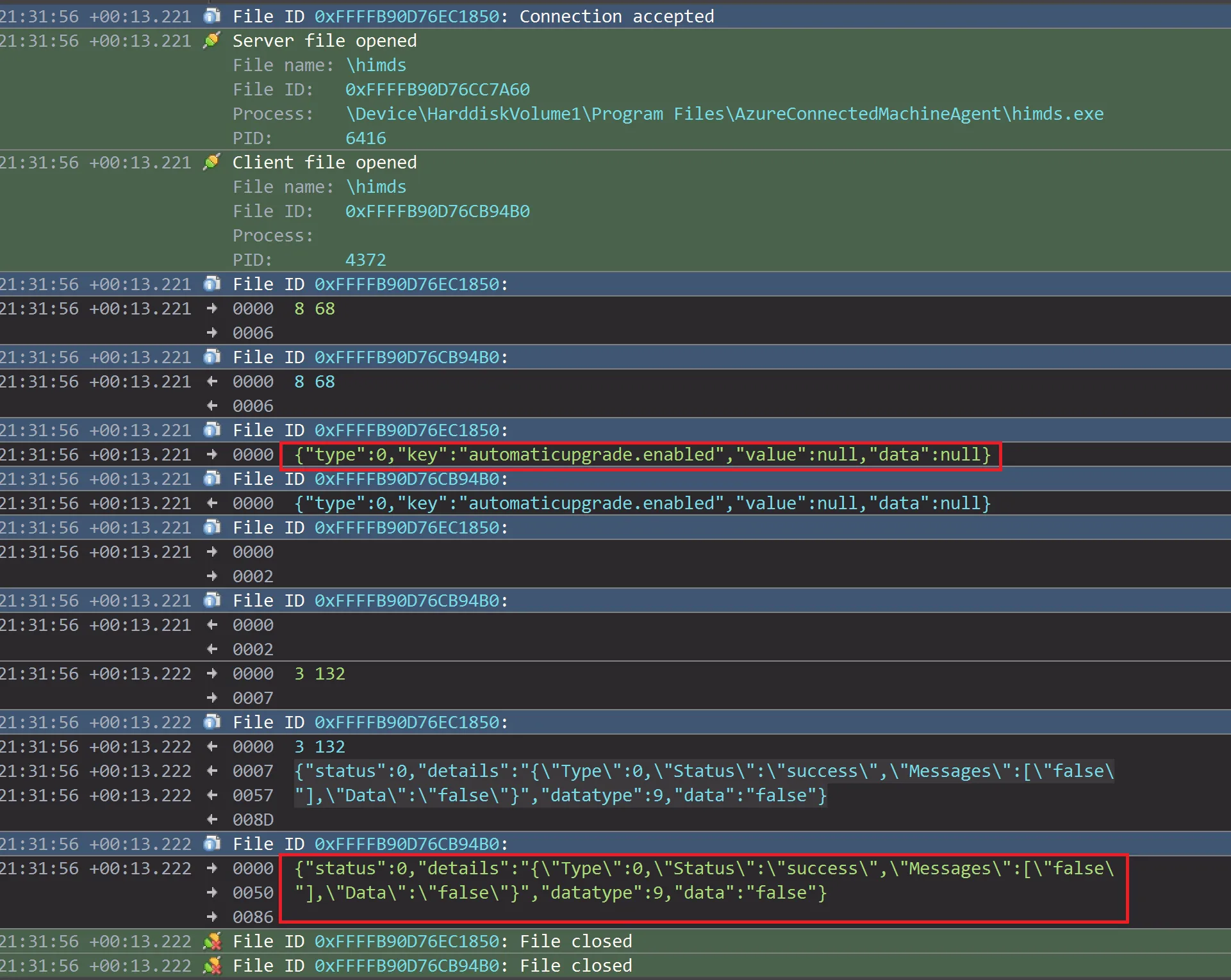
azcmagentazcmagent then checked when the last update attempt was made. If this value was less than three days from the current time, then the script would exit as shown below:try
{
$lastAttemptTimestamp = azcmagent config get automaticupgrade.lastattempt.timestamp
$lastAttemptTimestamp = [int]::Parse($lastAttemptTimestamp)
$timeSinceLastAttemptSec = $timestamp - $lastAttemptTimestamp
if($timeSinceLastAttemptSec -lt 60 * 60 * 24 * 3){ # 60 seconds/min * 60 min/hr * 24 hr/day * 3 days
Send-Log "Last attempt failed, skipping upgrade" "AZCM0168" $show
exit 0
}
} catch {
Invoke-Failure -ErrorCode "AZCM0166" -Message "unable to check last attempt timestamp $_"
}
try
   {
        $downloadlink = azcmagent config get automaticupgrade.downloadlink

        $proxy = (azcmagent config get proxy.url -j | ConvertFrom-Json).Data
        if ($proxy){
             $response = Invoke-WebRequest -UseBasicParsing -Uri $downloadlink -Method Head -Proxy $proxy
        }
        else{
             $response = Invoke-WebRequest -UseBasicParsing -Uri $downloadlink -Method Head
        }
    } catch {
        Invoke-Failure -ErrorCode "AZCM0169" -Message "unable to get or reach automaticupgrade.downloadlink: $_"
    }
C:\Program Files\AzureConnectedMachineAgent\install_azcmagent.ps1) in a variable defined at line 182:$onboardingScriptPath = Join-Path -Path $env:ProgramFiles -ChildPath "AzureConnectedMachineAgent" | Join-Path -ChildPath "install_azcmagent.ps1"
C:\Program Files\AzureConnectedMachineAgent\install_azcmagent.ps1 script was triggered at line 191, assuming proxy was not configured:& $onboardingScriptPath -AltDownload $downloadlink -OutFile $outfilePath
install_azcmagent.ps1 script at line 444, a variable $msiFile is defined as shown below:$msiFile = Join-Path "$env:Temp" "AzureConnectedMachineAgent.msi"
Download-With-Retries was called at line 454. The Download-With-Retries function downloaded the installer and stored it in the location defined in the variable $msiFile as seen in the command:Invoke-WebRequest -UseBasicParsing -Proxy $Proxy -Uri $downloadUri -OutFile $msiFile
& "$env:TEMP\install_windows_azcmagent.ps1";
Unfortunately, the download location is C:\Windows\Temp. The exploitation has been covered in a previous writeup. However, this is not the focus point in this scenario as the MSI file would be downloaded from an arbitrary source specified in the PoC.
An attacker who could impersonate the named pipe, i.e. creating a malicious named pipe server, could send the malicious upgrade data to the azcmagent client that is interacting with the himds pipe. During the research, the response value was set to true in the execution of $enabled = azcmagent config get automaticupgrade.enabled.
This resulted in the script continuing to execute with the rest of the script. Similarly, PipeMonitor was used to view the legitimate pipe traffic for other commands and update the response within the named pipe as required.
As the scheduled task was executed as NT AUTHORITY\SYSTEM, the execution of the task failed with the following error:
C:\Program Files\AzureConnectedMachineAgent\azcmagent_check_updates.ps1 : unable to get or reach automaticupgrade.downloadlink: The response content cannot be parsed because the Internet Explorer engine is not available, or Internet Explorer's first-launch configuration is not complete. Specify the UseBasicParsing parameter and try again. + CategoryInfo : NotSpecified: (:) [Write-Error], WriteErrorException + FullyQualifiedErrorId : Microsoft.PowerShell.Commands.WriteErrorException,azcmagent_check_updates.ps1
Debugging the root cause, it was found that the Internet Explorer's first-launch configuration was enabled. While different users may have different deployment methods, the proof-of-concept assumed that Internet Explorer's first-launch configuration was overcome with either system administrators disabling the feature by setting the registry key HKEY_LOCAL_MACHINE\SOFTWARE\Microsoft\Internet Explorer\Main\DisableFirstRunCustomize as DWORD 2 or some other component of the system had completed Internet Explorer's first-launch configuration leading to no errors. Although error handling was implemented in the try-catch blocks of the PowerShell scripts, the lack of integrity checks could be exploited to download and execute a malicious msi file.
msi_search.ps1 script.msiexec repair with the command: msiexec.exe /fa C:\Windows\Installer\name.msihimds.exe to terminate before starting a rouge named pipe server.azcmagent manually or wait for the azcmagent trigger between 01:00 and 02:00.The installation script should download and execute the legitimate Azure Arc MSI installer.
After successfully completing the update process a malicious installer is executed leading to local privilege escalation.
The azcmagent now verifies the owner of the named pipe himds before interacting with the server. The azcmagent stops interacting with the named pipe if the owner is not the himds local service account or the local administrator.
Update the agent to the latest version available.
| Date | Action |
|---|---|
| 23 Jul 2025 | Initial disclosure |
| 24 Jul 2025 | Report under review |
| 2 Sep 2025 | Vulnerability confirmed |
| 9 Sep 2025 | CVE-2025-55316 published |