Three Confirmed Vulnerabilities in Truesec LAPSWebUI
-
 Laban Sköllermark
 - 16 Mar 2026
Laban Sköllermark As part of an assessment Reversec encountered the LAPSWebUI application developed by Truesec for handling Windows users’ local administrator passwords. Following a review of its security posture, several vulnerabilities were discovered and reported to the vendor. Subsequently these issues have been addressed in version 2.4 which was released in January 2026.
Microsoft describes their solution for managing administrator passwords best themselves:
Windows Local Administrator Password Solution (Windows LAPS) is a Windows feature that automatically manages and backs up the password of a local administrator account on your Microsoft Entra-joined or Windows Server Active Directory-joined devices.
Some of the security benefits of using Windows LAPS are that:
There is also a “legacy” version of LAPS called Microsoft LAPS, but we won’t discuss that version in this blog.
The cybersecurity company Truesec developed a web-based user interface integrated with Windows LAPS which supported a couple of distinct use cases. On one side it allowed users approved to use local administrative privileges to request a local administrator password as part of a self-service user flow. On the other, it allowed helpdesk or other service technicians to look up passwords for multiple devices based on their permissions within the organisation. More details can be seen in Truesec’s release announcements (1, 2) and their service description (PDF) for more background to the solution in question.
Reversec contacted Truesec on the 23rd of December 2025 with a vulnerability report regarding the security issues observed as part of a security assessment. The report included four vulnerabilities, including one security issue which did not have a security impact in the assessed environment but was nevertheless included because of the major impact it would have in certain exploitable organisation configurations.
Following the initial triage process, Truesec confirmed three (non-critical) vulnerabilities on the 5th of January 2026 and stated that fixes will be included in the next version (v2.4) and that it was planned to be released already in January. The potentially high severity vulnerability (more information below) was judged to not be exploitable in any customer configuration, but Truesec confirmed that they were planning a redesign of their implementation in order to further mitigate the potential impact.
The three confirmed vulnerabilities were originally rated as Medium severity issues, using CVSSv4 vectors for the judgement. Following further review Reversec categorised one of them as Low instead (justification can be seen in the individual advisory). Truesec did not provide any CVSS scoring of the vulnerabilities as such the calculated CVSSv4 scores by Reversec were used throughout the advisories.
The confirmed vulnerabilities were the following. See the individual security advisories for details:
A short summary of each of the advisories can be seen below where Reversec discovered that:
The session cookie issued to a LAPSWebUI user lasted more than 13 days, which was considered to have a substantially long lifetime for such a sensitive tool. An administrative setting to require an Entra ID sign-in for every password retrieval was already available as an optional configuration, but was not enabled in the environment where Reversec evaluated the LAPSWebUI application.
The Logout button in LAPSWebUI did not invalidate the user’s LAPSWebUI session. In certain scenarios this could result in a long-lived session being accessible to an attacker with a foothold on the user device despite the user initiating an explicit log out flow within the application itself.
The LAPSWebUI application did not include security headers in server responses to prevent the browser caching web pages. This resulted in an attacker with a foothold on the user device being able to retrieve local admin passwords were stored on disk by the user’s browser.
All three confirmed vulnerabilities were fixed in version 2.4 of LAPSWebUI according to its vendor Truesec.
In addition to the previously discussed advisories, Reversec discovered two other security-related issues with the LAPSWebUI application. A summary of each issue can be found in the following sub-sections.
We were sooo close to reporting a very serious vulnerability in LAPSWebUI. As the issue was not exploitable in the assessed environment, we ended up describing the problem to our client in a finding rated Informational. However, in an effort to improve the application solution, Reversec still reported it to Truesec as a finding with a high potential impact since we could not rule out that there existed other configurations of LAPSWebUI that were exploitable.
If it were exploitable, it would have been categorised as CWE-639 Authorization Bypass Through User-Controlled Key.
LAPSWebUI can use (and did in our client’s environment) Entra ID for authentication. The application then used a Microsoft-signed JWT for logging in the user in the web application and setting a session cookie. The request looked like this:
POST /signin-oidc HTTP/1.1
Host: [REDACTED]
Cookie: .AspNetCore.Correlation.[...]=N; .AspNetCore.OpenIdConnect.Nonce.[...]=N; AzureAppProxyAnalyticCookie_[REDACTED]_https_1.3=[...]
[...]
Referer: https://login.microsoftonline.com/
Content-Type: application/x-www-form-urlencoded
Content-Length: 2198
Origin: https://login.microsoftonline.com
[...]

id_token=eyJ0eXAiOiJKV1QiLCJhbGciOiJSUzI1NiIsImtpZCI6InJ0c0ZULWItN0x1WTdEVlll
   U05LY0lKN1ZuYyJ9.[REDACTED].[...]&session_state=00abff59-8220-3605-d3a8-e61f2b5d3861
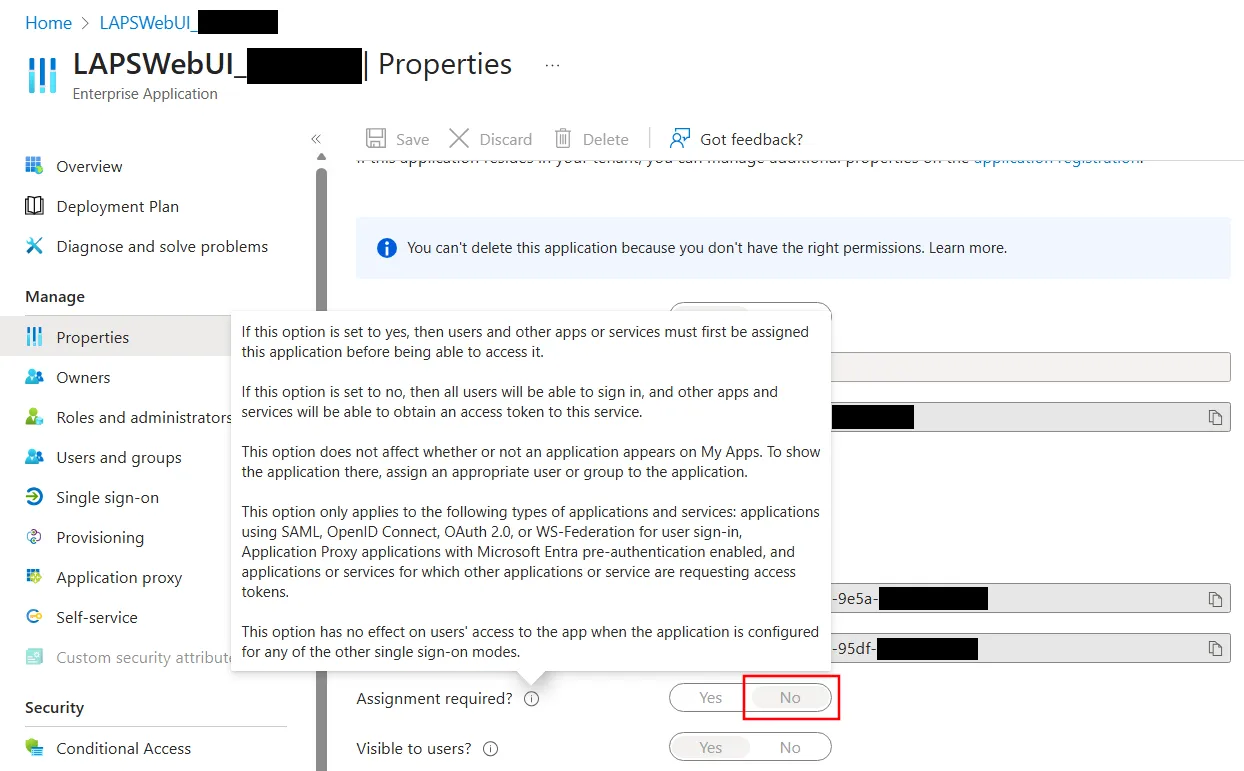
We used the author’s Reversec Entra ID account which was invited as a guest user in our client’s Entra ID tenant. It was possible for a guest in the default setting for the Enterprise Application created by a LAPSWebUI installation prior to version 2.4 to login to the application. As it was noted to not require assignment and thereby allowing guest users in the tenant to authenticate to the application:
The JWT provided to LAPSWebUI when logging in was decoded as follows:
{
  "typ": "JWT",
  "alg": "RS256",
  "kid": "rtsFT-b-7LuY7DVYeSNKcIJ7Vnc"
}.{
  "aud": "[REDACTED]",
  "iss": "https://login.microsoftonline.com/[REDACTED]/v2.0",
  "iat": [REDACTED],
  "nbf": [REDACTED],
  "exp": [REDACTED],
  "aio": "AYQAe/8aAAAAQDWITshVr[...]",
  "idp": "https://sts.windows.net/ea33927c-14dc-4a64-9482-d3df5ef087b9/",
  "name": "Laban Sköllermark",
  "nonce": "638998405736913083.[...]",
  "oid": "b7ab5fdb-3de5-4540-bfd3-9b233130d184",
  "preferred_username": "laban.[plz-no-spam]@reversec.com",
  "rh": "1.AXoA_icEFapGik2LJxn7bwp2cDgUJ216rqxNnlpEw1ICPZ7mAFR6AA.",
  "sid": "00abff59-8220-3605-d3a8-e61f2b5d3861",
  "sub": "_aAOkGmW_ADUzQ77HOdbP6_qv-FKOoOtv95sgRkAvF8",
  "tid": "150427fe-46aa-4d8a-8b27-19fb6f0a7670",
  "uti": "lV3-ws-ckUmzkISvftyBAA",
  "ver": "2.0"
}.[Signature]
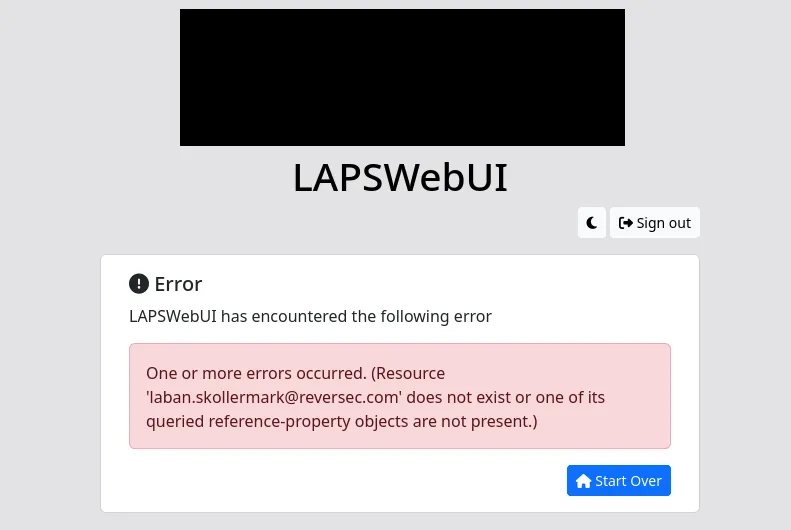
The guest account in the client’s tenant used above yielded the following error message, which led to the conclusion that under the current LAPSWebUI configuration, authorization decisions were taken based on the claim preferred_username. That claim is mutable and under some circumstances controlled by the user.
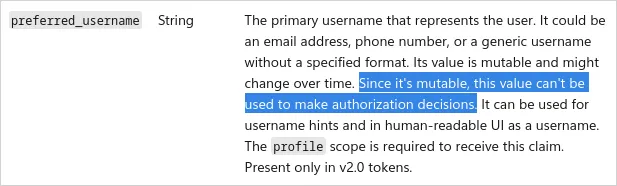
Microsoft identity platform’s ID token claims reference says the following about the preferred_username claim:
That sounded serious. If we set up our own Entra ID test tenant, we can control the preferred_username. We can let the users sign in with non-UPN email addresses by enabling the Connect Sync setting Email as an alternate login ID and setting proxy addresses for the users (see Sign-in to Microsoft Entra ID with email as an alternate login ID). We hoped to be able to trick Microsoft into signing a JWT when logging in as a guest user and being able to control the preferred_username claim and set it to match some arbitrary user’s email address (and UPN) in the client’s tenant, but it was unsuccessful. Our conclusions following testing of the behaviour were:
preferred_username was included by default for guest accounts (we had to add it as an optional claim in the test application in our test tenant in order to see it)preferred_username in the ID tokenpreferred_username was there but always set to the UPNWe tried some TOCTOU attacks as well (Time-of-check to time-of-use), flipping the Email as alternate login ID switch at different points in time. For instance, after logging in to the application in our account but before logging in with the corresponding guest account to the target application in the target tenant. We also tried flipping the switch while the second authentication waited for confirmation by the Authenticator app. We were not successful in getting an ID token for the target application with a preferred_username claim that contained anything else than our test tenant’s domain.
Based on testing conclusions, we suspect that although the application configuration in the client environment was currently not vulnerable, the same configuration might have been vulnerable to a malicious modification of a guest username in the past. ¯\(ツ)/¯
This potential security issue was not reported to Truesec in the original communication in December 2025 since we could not exploit it. However, in an effort to coordinate resolution of the other discovered issues we shared it with the vendor on the 14th of January 2026. An excerpt from the message shared with Truesec can be seen below:
By the way, there is an additional small problem that I spent too much time trying to exploit. I think you want to fix it in a future version anyway since the solution is so simple. When printing the password for an account, it’s done twice in the HTML code. First the whole password, and then it’s properly HTML encoded. But it’s also printed character-by-character. Here HTML encoding is missing. This theoretically leads to HTML injection, but only one character at a time. I failed to bypass restrictions so I could never get XSS, which was the plan. (By controlling what password was sent by one’s own computer to Intune/Entra, the idea was to XSS an admin that had access to LAPS for many computers. A prerequisite would be that your recommended CSP was not in place.)
Reversec set up the Windows endpoint to point network traffic to a local proxy using the following command netsh winhttp set proxy 127.0.0.1:8080. Following the configuration of the proxy, we used the PowerShell cmdlet Reset-LapsPassword (documentation) to trigger rotation of the computer’s local admin password. This allowed us to test the communication done with the Entra endpoint https://enterpriseregistration.windows.net/manage/[REDACTED GUID]/lapsdevicepasswordupdate/[REDACTED GUID]?api-version=1.0&client-request-id={[REDACTED GUID]}&return-client-request-id={[REDACTED GUID]} and attempt to fake the password sent to Entra and include various Cross-Site Scripting (XSS) payloads, but we could never use the one-character HTML injection to trigger XSS.
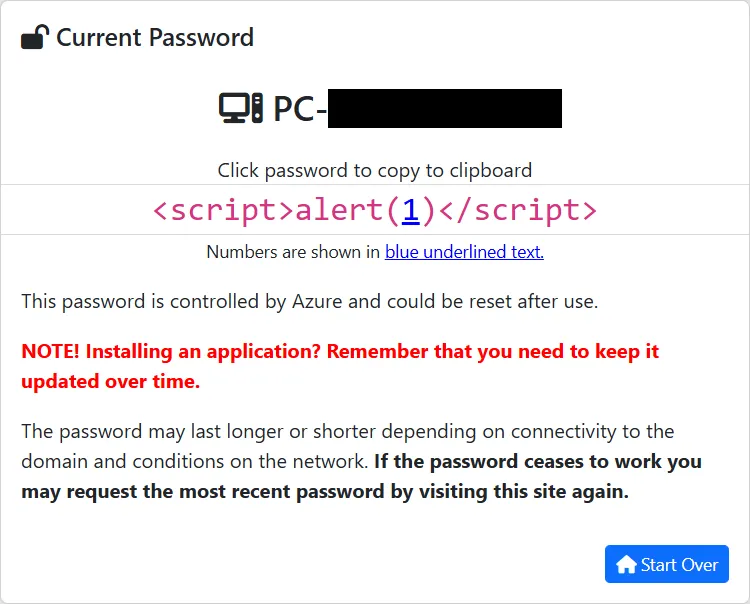
We had saved the above screenshot of an early XSS attempt via the LAPS password retrieved by LAPSWebUI, but we did not save the corresponding HTML code. It’s reconstructed below from how another password with special characters was represented. The complete password was correctly HTML encoded in the data-pass attribute of the <code> tag, but the individual password characters in the <span> tags were not:
<code id="code" data-pass="<script>alert(1)</script>">
<span class='code-character'><</span>
<span class='code-character'>s</span>
<span class='code-character'>c</span>
<span class='code-character'>r</span>
<span class='code-character'>i</span>
<span class='code-character'>p</span>
<span class='code-character'>t</span>
<span class='code-character'>></span>
<span class='code-character'>a</span>
<span class='code-character'>l</span>
<span class='code-character'>e</span>
<span class='code-character'>r</span>
<span class='code-character'>t</span>
<span class='code-character'>(</span>
<span class='code-number'>1</span>
<span class='code-character'>)</span>
<span class='code-character'><</span>
<span class='code-character'>/</span>
<span class='code-character'>s</span>
<span class='code-character'>c</span>
<span class='code-character'>r</span>
<span class='code-character'>i</span>
<span class='code-character'>p</span>
<span class='code-character'>t</span>
<span class='code-character'>></span>
</code>
Although the impact was limited in its current state, we hope that this one-character HTML injection vulnproblem will be fixed in an upcoming version of LAPSWebUI.
Reversec follow our own vulnerability disclosure policy along with the vendors’ disclosure policies. It is important to adhere to these policies in order to protect our clients, the users of these products and the vendor.
Truesec have not disclosed any LAPSWebUI vulnerability information publicly or requested any CVE IDs for the vulnerabilities. We got this statement, approved for publication by them 2026-Mar-06:
Truesec maintains a direct working relationship with all organizations using LAPSWebUI as part of their consultancy engagements. Guidance and support regarding the version 2.4 update have been provided directly to all affected parties.
At Reversec we think that public security advisories are important for the cybersecurity industry. In the case that an outdated version of LAPSWebUI was in use within another organisation, security experts should have sufficient information available publicly to assess the risk posed by the use of that software version and make an educated decision regarding whether patching of the software should be prioritised. Therefore, we registered CVEs for the vulnerabilities ourselves (see IDs below).
(Also, the author had only one CVE with his name on it before. 😉)